

How can I include hyperlink in the description of the google calendar so that it
-
How can I include hyperlink in the description of the google calendar so that it will appear on the list of events as an active link?
The blog I need help with is: (visible only to logged in users)
-
Hi there!
I visited your site and it appears as if you may have solved your own issue. I took a look at the following event on your website:
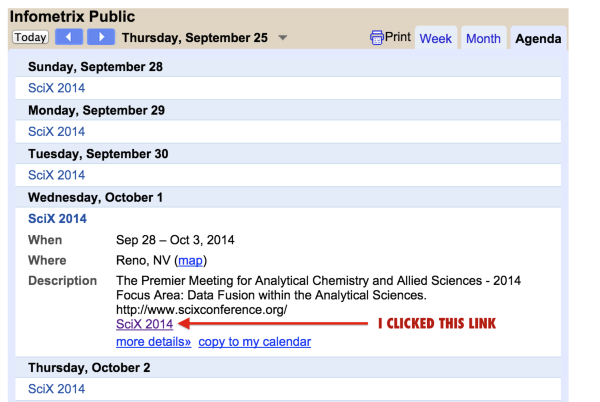
When I clicked the hyperlink, I was taken to https://www.scixconference.org/.
Is everything working well for you now, or can I help further? I you do need assistance, if you could direct me to a specific link that isn’t working, to your Google calendar, and to the URL to which you’re trying to connect, it would be very helpful.
Many thanks!
-
On the google calendar it appears fine but on the events page where it’s in a list format, the link is not showing in the description field.
-
Hi again,
…the link is not showing in the description field.
The only way to make that appear as a link in the list view is if you use the full URL, starting with http:// in the description in your google calendar.
It will look like this:
https://cloudup.com/cEiIlk-MyE7Let me know if you have any other questions. Cheers!
-
Hi again,
I’d like to see how it appears (or DOESN’T appear, in this case). Can you place the entire http:// URL in the Google calendar description? This is how I was able to make the link work in the Event list:
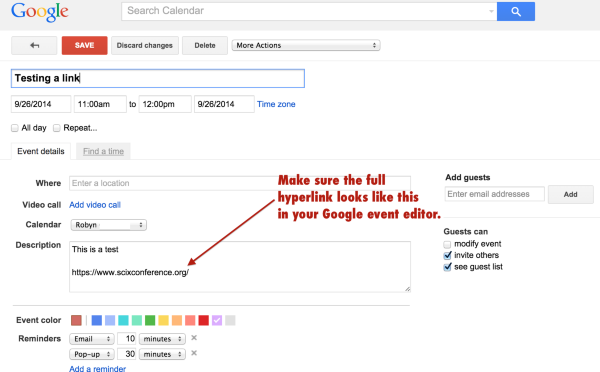
Please do the same thing I did above, so I can see where along the path the link is breaking. Let me know when you add the item, and which item it is on the calendar, so I can take a closer look.
I don’t have access to your Google calendar, so I do need your assistance to troubleshoot this issue. I appreciate the help and patience!
Thanks much.


- The topic ‘How can I include hyperlink in the description of the google calendar so that it’ is closed to new replies.
 WordPress.com Forums