

How can I make the email address field in my subscription form visible?
-
I’m trying out the email subscription form shortcode on my blog.
The messages are all there:”Follow blog via email”,”Enter your email address to follow this blog and receive notifications of new posts by email”, as wel as the “follow” button.
When I put it in,however, the borders of the field in which one would put his email address are invisible. A person would not know where to put it in.
How can I fix this? I’m referring to my http://www.leafsdiaries.com blog on a specific page:
http://leafsdiaries.com/why-leafs-diaries/Thank you.
The blog I need help with is: (visible only to logged in users)
-
Hi Antoni,
I looked on that site and found that there was a grey border box to put in an email address as seen here:

Cheers! Feel free to reach out if you have any questions!
-
Thanks a lot!
But the one that’s giving me problems is the one at the bottom of that same page:
http://leafsdiaries.com/why-leafs-diaries/
Thanks!
-
Hi Antoni!
Thanks for the clarification! I was able to reproduce the issue. It has been reported, and we are working on a fix.
As a temporary workaround, I have added some custom CSS so that the border around the box can be seen. It should look like this now:
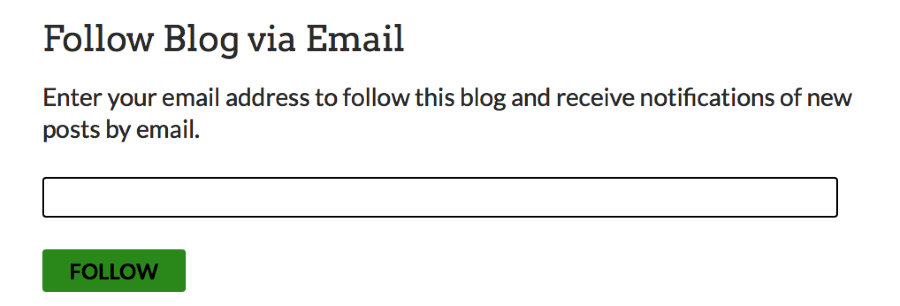
Thank you for your patience and for the heads up!
Cheers!
-
-


- The topic ‘How can I make the email address field in my subscription form visible?’ is closed to new replies.
 WordPress.com Forums