

How can I manage Multiple Occurrences of Blog Name in Drop Down List?
-
I recently migrated my blog that was publishing here. I migrated it over to Bluehost. My blog currently exists here and also at Bluehost.
I had purchased my own domain along with a premium package when I first started the blog about a year ago. I received help here in the forum about a week ago from a staff member in separating out my domain renewal from my package renewal. My domain will now renew automatically on July 24th. I am fine with that because I don’t want to be under time pressure when I eventually go through the process of transferring the domain to Bluehost, which I will eventually do.
The url of my blog here is hexyladydotcom.wordpress.com
The url of my domain blog at Bluehost is hexylady.com (using my domain)Now I have a question about accessing my blogs from my WordPress.com login. I notice in the list of my blog that drops down, that “Hexy Lady” appears twice. I tried to change the way the hexyladydotcom.wordpress.com site appeared by editing the Site Title in the General settings. I changed it to “WordPress Hexy Lady”. However, even logging out and logging back in does nothing to change the way the name of the blog appears in the drop down menu. I still have two “Hexy Lady” blogs. Can this be fixed? It will help me to log into the correct blog to add content.
I also have a question about how to stop hexyladydotcom.wordpress.com from redirecting to hexylady.com without messing up the settings that point the hexylady.com domain to my new host at Bluehost.
It would be helpful to me to be able to view the older site while I add features to the newer site. While the migration brought over all of my content, there are things like sharing buttons, and icons next to comments that do not appear on the new site yet, and I suspect that I need activate some jetpack features to make that happen.
When I view “my domains” in the Store under hexyladydotcom.wordpress.com I see that hexylady.com is selected as the primary domain, and that the domains below will redirect to it. (hexyladydotcom.wordpress.com) is the only one below.
I suspect that I should make hexyladydotcom.worspress.com the primary domain if I want to be able to access it with it’s full url. But then what happens to hexylady.com? I don’t want hexylady.com redirecting to hexyladydotcom.wordpress.com. That would be a disaster. I don’t want to make this change if something bad will happen.
If someone could flag this for support I would appreciate it. I got faster results in the private forum last time than I did with a private support message, so I am posting here.
Thanks in advance.
Terri
The blog I need help with is: (visible only to logged in users)
-
Sorry. I meant I got faster results in the PUBLIC forum last time. I was quite impressed with the speed with which I got a response.
Terri
-
Hi there!
Let me know if I missed any of your questions!
I notice in the list of my blog that drops down, that “Hexy Lady” appears twice. I tried to change the way the hexyladydotcom.wordpress.com site appeared by editing the Site Title in the General settings. I changed it to “WordPress Hexy Lady”. However, even logging out and logging back in does nothing to change the way the name of the blog appears in the drop down menu. I still have two “Hexy Lady” blogs. Can this be fixed? It will help me to log into the correct blog to add content.
In your blogs list, you should see a URL listed underneath the title of the site. With the site title changed, you should also see that difference now, but if you click on the title of either site it will take you to your new site, not your old one. You’ll need to click on one of the Administrative links underneath that in order to access your old site.
I also have a question about how to stop hexyladydotcom.wordpress.com from redirecting to hexylady.com without messing up the settings that point the hexylady.com domain to my new host at Bluehost.
There’s no way to do this until you transfer the domain to Bluehost. Currently the domain hexyladydotcom.wordpress.com directs to hexylady.com, which points to your new site. That link will go away once you transfer the domain away. Here’s our guide on transferring domain:
You can however access the Customizer for the old site. This will show you a preview pane with most of your site’s design settings. Will that work for you?
https://hexyladydotcom.wordpress.com/wp-admin/customize.php
I suspect that I should make hexyladydotcom.worspress.com the primary domain if I want to be able to access it with it’s full url. But then what happens to hexylady.com? I don’t want hexylady.com redirecting to hexyladydotcom.wordpress.com. That would be a disaster. I don’t want to make this change if something bad will happen.
Definitely don’t do this until you’ve transferred your domain away from WordPress.com.
Let me know if I can help further!
-
Shawnajroberts,
Thank you for your response.
Starting from the bottom of your post and working my way up…
Thank you for the warning not to change the primary domain until the domain is transferred. I won’t do that.
The url you gave me to customize hexyladydotcom.wordpress.com helps me to visualize what is there. That should be enough for now. I see I can access that link from the “manage my blogs” page. So I will be able to find it.
I will read up on transferring the domain name to Bluehost. I was going to wait until July 24th do do that. But I could renew early and then initiate the transfer sooner. Does that make sense to do?
You say:
<In your blogs list, you should see a URL listed underneath the title of the site. With the site title changed, you should also see that difference now, but if you click on the title of either site it will take you to your new site, not your old one. You’ll need to click on one of the Administrative links underneath that in order to access your old site.>I do not see that the site title has changed on the “managing your blogs page”. I still see “Hexy Lady” listed for both of the blogs. I have a screen capture of that, but it doesn’t look like I can post it here. I do, however, see the title as “WordPress Hexy Lady” when I click customize.
Terri
-
I will read up on transferring the domain name to Bluehost. I was going to wait until July 24th do do that. But I could renew early and then initiate the transfer sooner. Does that make sense to do?
You can do this either way. If you transfer it now, it should finish processing before your renewal date. Then you can just renew it with Bluehost. Its entirely up to you, so if you want to just focus on getting your new site fully set up before transferring (and the Customizer preview pane is enough to be able to do that) go ahead and do that. :)
I do not see that the site title has changed on the “managing your blogs page”. I still see “Hexy Lady” listed for both of the blogs. I have a screen capture of that, but it doesn’t look like I can post it here. I do, however, see the title as “WordPress Hexy Lady” when I click customize.
Can you upload the screenshot to your Media Library so I can see what you’re seeing?
-
I have uploaded two screenshots to the media library for hexyladydotcom.wordpress.com
One screenshot is a jpg of the “manage my blogs” page which shows “Hexy Lady” appearing as the title of both blogs.
The other screenshot is a jpg of the customize window. This clearly shows that the title has been changed to “WordPress Hexy Lady”. It even shows that I changed the tag line to “this was a temporary home for hexylady.com”.
-
Thanks for the images! I do see what you mean. I’ll chat with our developers about why that isn’t updating. In the meantime, here’s the URLs I was talking about before to help you figure out which is which:
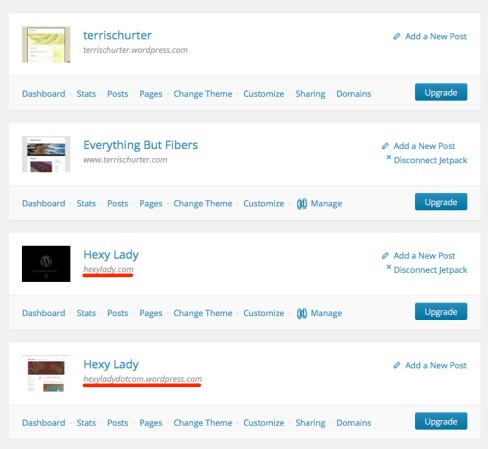
-
Yes. I did notice the URL listings you pointed out. But they don’t show in the drop down list available from my Avatar. Once the title is forced to update it won’t be an issue anymore, and I guess I’ll just access the sites from “managing my blogs”.
-
Okay! I understand now. I’ll check in with the developers about those links as well.
You can also update the Blavatar for one of the sites. That’s the little image that appears next to the site title. You can change that image through Settings > General.
Let me know if you have any other questions!
-
The title has updated to “WordPress Hexy Lady”. I can be viewed now on the “managing my blogs” page. It also shows up on the drop down from the Avatar with its distinctive title. So all appears to be good now with respect to being able to distinguish the blogs easily.
-
Fabulous! It probably just needed a little time to update! :)
Let me know if I can help with anything else!


- The topic ‘How can I manage Multiple Occurrences of Blog Name in Drop Down List?’ is closed to new replies.
 WordPress.com Forums