

How can I move the theme used down to bottom of page – Caperverso
-
This isn’t for my site, its for my client’s: https://mygoodmeasure.wordpress.com/
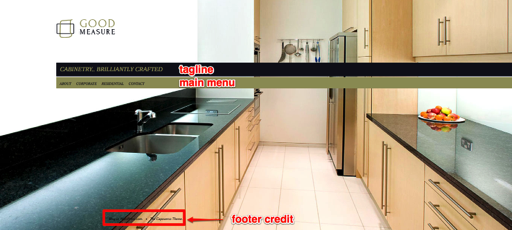
The whereabouts of the theme link is ok for all the site except the Home page, where its sort of floating in the middle! I’m not sure you can do anything about the styling of it – but I would like to make sure its positioned at the bottom of the page on that page, aligned left.
Having said I don’t mind how it looks elsewhere on the site – I would like to alter the colour of the footer background behind that link – so it matches the rest of the site… so any tips on that would be good too!
Anyone help?
Thanks, Laura
The blog I need help with is: (visible only to logged in users)
-
The whereabouts of the theme link is ok for all the site except the Home page, where its sort of floating in the middle!
I find the theme link at the bottom, in the footer navigation bar, on the homepage, as it is on the other pages.
The other two modifications you suggest may be possible, but each would, I think, require CSS customization.
-
Could you please provide a screenshot of what you’re seeing and specify the device/OS/browser and version you’re using? The footer credit appears at the bottom on the homepage for me as well, in Firefox 37/Mac 10.9.5.
Here’s a guide on how to make a screenshot:
http://en.support.wordpress.com/make-a-screenshot/You can upload the screenshot – in a graphic format like JPG, PNG, or PDF – in your Media Library so I can see it. Thanks.
I would like to alter the colour of the footer background behind that link – so it matches the rest of the site…
CSS can be used to customize elements on your site, as you know. As a web designer you can learn how to target HTML elements to change the look and feel.
Here are some good resources you can explore to boost your CSS skills so you can better help your clients with site customization:
https://cssworkshop.wordpress.com/
https://dailypost.wordpress.com/2013/07/25/css-selectors/
http://dailypost.wordpress.com/2013/06/21/css-intro/
http://dailypost.wordpress.com/2013/08/29/css-matched-rule-pane/
http://en.support.wordpress.com/custom-design/how-to-find-your-themes-css/
http://htmldog.com/guides/css/ -
Thanks for the responses.
I have uploaded a screengrab of what I see. I have checked in my other browsers and can see its worst in the one I’m mainly viewing from – FireFox 37.01 on a pc. However, although on the other browsers its at the bottom more or less, they all align left from a different place to my heading and menu above. I’d like it to align left in the same place if that’s possible?
So you know, I have very little time to learn css so can only do what I can do in my 1 – 2 hours a day that I have (I work from home with a baby!) I am a designer really, not a programmer. So any help would be appreciated.
I have managed to work out how to alter the footers background colour but struggling to alter anything else.
-
Thanks for the screenshot:
https://mygoodmeasure.files.wordpress.com/2015/04/ff_screengrab.pngThat’s not what I’m seeing in my version of Firefox, where the credit is at the bottom left.
Does the credit look properly placed on the Capoverso demo site here? https://capoversodemo.wordpress.com/
If it does, then I’d suggest you try temporarily removing all your custom CSS to see if that resolves it, then adding it back one piece at a time to find the portion that’s causing the issue in your browser.
-
Your screenshot is what I see also – on my other browsers. And so if most browsers have the footer at the bottom then I’m not too concerned about it. What I would like to do is though, as I said, is to get the alignment the same as the heading and menu above it i.e. left aligned in the same position. Is that something you can help with?
-
Removing your custom CSS temporarily using a browser inspector, I can see that the footer credit lines up perfectly with the site logo.
Since you’ve already added a large amount of custom CSS, including some with media queries, and some CSS which has errors in it, tweaking the position of the footer credits is much trickier now.
The credits have the class .site-info, so you could try moving it around using CSS positioning properties like margin.
You can also running your CSS through a validation tool like https://jigsaw.w3.org/css-validator/ if you’d like to try to fix the errors. For example, this declaration is missing the dot in front of class name:
menu-home-menu-container a:hover {
     background-color: #ffff00;
}
Good luck!
-
Thanks for telling about the validation tool. That’s new to me but can see how useful it is.
I have tried altering my margin with site-info and it’ll do for now!
Thanks again
-


- The topic ‘How can I move the theme used down to bottom of page – Caperverso’ is closed to new replies.
 WordPress.com Forums
