• Plans & Pricing
  • Log in
  • Get started
  • WordPress Hosting
  • WordPress for Agencies
  • Become an Affiliate
  • Domain Names
  • AI Website Builder
  • Website Builder
  • Create a Blog
  • Newsletter
  • Professional Email
  • Website Design Services
  • Commerce
  • WordPress Studio
  • Enterprise WordPress 
  • Overview
  • WordPress Themes
  • WordPress Plugins
  • WordPress Patterns
  • Google Apps
  • Support Center
  • WordPress News
  • Business Name Generator
  • Logo Maker
  • Discover New Posts
  • Popular Tags
  • Blog Search
Get started
  • Sign up
  • Log in
About
  • Plans & Pricing
Products
  • WordPress Hosting
  • WordPress for Agencies
  • Become an Affiliate
  • Domain Names
  • AI Website Builder
  • Website Builder
  • Create a Blog
  • Newsletter
  • Professional Email
  • Website Design Services
  • Commerce
  • WordPress Studio
  • Enterprise WordPress  
Features
  • Overview
  • WordPress Themes
  • WordPress Plugins
  • WordPress Patterns
  • Google Apps
Resources
  • Support Center
  • WordPress News
  • Business Name Generator
  • Logo Maker
  • Discover New Posts
  • Popular Tags
  • Blog Search
Jetpack App
  • Learn more
  • Support Center
  • Guides
  • Courses
  • Forums
  • Contact
Search
  • Support Center
  • Guides
  • Courses
  • Forums
  • Contact
Forums / How can I use Large Image Twitter Cards for WordPress.com Blog Post?

How can I use Large Image Twitter Cards for WordPress.com Blog Post?

  • Unknown's avatar
    triangleexplorer · Member · Jan 13, 2015 at 10:02 pm
    • Copy link Copy link
    • Add topic to favorites Add topic to favorites

    I have validated my blog so a twitter “summary card” is displayed when I share a blog post on twitter. I would like to have them instead displayed using the “Large Image” summary card, but I can’t figure out what I need to do to make this happen. I am using a wordpress.com blog so I can’t install and SEO plugin (which is what all the directions I find online seem to address). Is there a tip or trick to get the Large image Summary Card to work for my posts? Thanks!

    The blog I need help with is: (visible only to logged in users)

  • Unknown's avatar
    timethief · Member · Jan 13, 2015 at 10:11 pm
    • Copy link Copy link

    See here please:
    https://en.forums.wordpress.com/topic/where-to-create-twitter-summary-card?replies=3#post-1597572
    https://en.forums.wordpress.com/topic/images-not-being-used-by-twitter?replies=11#post-2207124

  • Unknown's avatar
    triangleexplorer · Member · Jan 13, 2015 at 10:25 pm
    • Copy link Copy link

    Thanks,

    Clarify my wordpress.com custom domain is whitelisted for Twitter Cards. I did this by using the tool: https://cards-dev.twitter.com/validator.

    So when I write a new post on wordpress.com and publish it a tweet does autimatically go out on my tiwtter account with a link to the blog post and a summary card which contains a small thumbnail image.

    I’m just trying to figure out what I need to do in order to get it to be a Large Image Summary Card instead of just the summary card I already have. Most of the info I have read in the forums and online about switching between card types is with regards to blogs that allow SEO Yoast Plugin to handle this, but I can not use that on my site, so I’m not sure what I can do.

    I hope that makes sense. Thanks for the help!

  • Unknown's avatar
    timethief · Member · Jan 13, 2015 at 10:28 pm
    • Copy link Copy link

    I tagged this thread for a Staff response. Please subscribe to it so you are notified when they respond. To subscribe look in the sidebar of this thread, find the subscribe to topics link and click it.

  • Unknown's avatar
    alexjgustafson · Member · Jan 15, 2015 at 5:07 pm
    • Copy link Copy link

    Hi triangleexplorer,

    My apologies, but we currently don’t allow customization of the meta-data required for those settings in Twitter cards. Our WordPress.com SEO system sets the twitter card tags automatically with every new post or page you create.

    -Alex G.

  • Unknown's avatar
    triangleexplorer · Member · Jan 15, 2015 at 5:17 pm
    • Copy link Copy link

    Alex,

    Thanks for the response. No worries. As I researched this more I began to suspect I didn’t have the option of changing the card, but having confirmation and knowing that I wasn’t missing something is a great help to me and I appreciate it!

    Thank you,

    -TriangleExplorer

  • Unknown's avatar
    mashet · Member · Jan 23, 2015 at 2:01 pm
    • Copy link Copy link

    I have the same issue.

    Can’t figure out why validation brings up a perfect card with large image, but a tweet – shared from the post or pasted url on twitter – does not!

    My blog is http://theurgetowander.com/

  • Unknown's avatar
    mashet · Member · Jan 23, 2015 at 2:02 pm
    • Copy link Copy link

    My card shoes no image at all.

  • Unknown's avatar
    alexjgustafson · Member · Jan 23, 2015 at 3:19 pm
    • Copy link Copy link

    @mashet ,

    Could you please share a URL from your blog and the tweet sharing it where the card did not function properly?

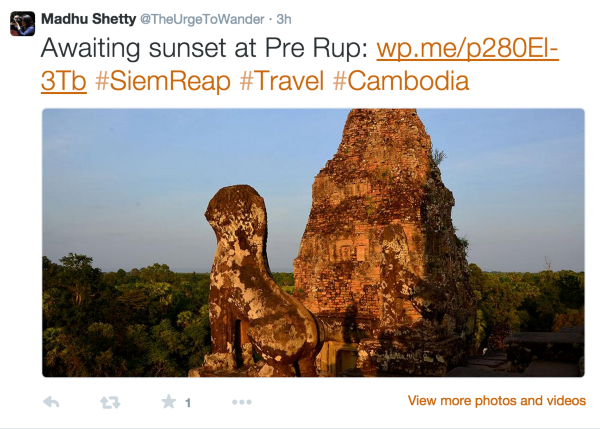
    Briefly looking at your twitter profile, the twitter card looks right on the share from three hours ago:

    -Alex G.

  • Unknown's avatar
    mashet · Member · Jan 23, 2015 at 9:26 pm
    • Copy link Copy link

    Hi Alex,

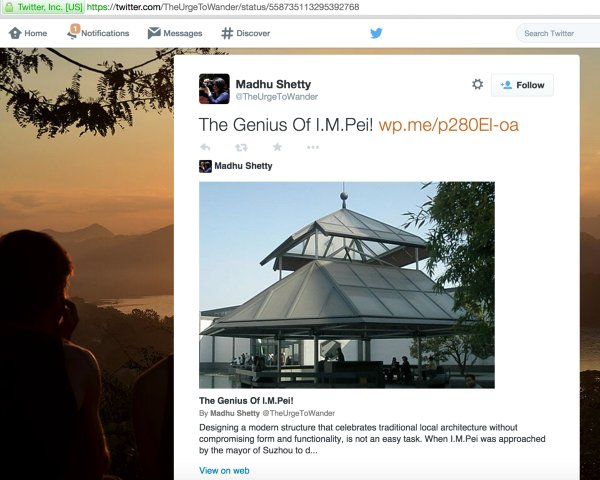
    Here it is: https://twitter.com/TheUrgeToWander/status/558735113295392768

    I just figured the image does not show up by default until one expands the tweet. defies the purpose if readers don’t bother to do it.

    Is it possible to change the current ‘Summary with Large Image’ card to an Image card?

    Many thanks.

  • Unknown's avatar
    alexjgustafson · Member · Jan 23, 2015 at 10:08 pm
    • Copy link Copy link

    Hi Madhu,

    When the full card is shown depends on the environment in which a tweet is being read. In the standard Twitter apps and twitter.com this would be when a reader expands the tweet. Though the various third-party Twitter clients offer other settings on how feeds can be viewed. In the link you’ve given me the card is created correctly:
    Is it possible to change the current ‘Summary with Large Image’ card to an Image card?

    Like in the original poster’s situation, we currently don’t allow customization of the meta-data required for those settings in Twitter cards. The cards currently being created are the only ones possible on WordPress.com.

    -Alex G.

  • The topic ‘How can I use Large Image Twitter Cards for WordPress.com Blog Post?’ is closed to new replies.

Tags

  • Large Image Summary Card
  • no metadata access
  • sharing - preview

About this topic

  • In: Support
  • 4 participants
  • 10 replies
  • Last activity 11 years
  • Latest reply from triangleexplorer

Couldn't find what you needed?

Contact us

Contact us

Get answers from our AI assistant, with access to 24/7 expert human support on paid plans.

Browse our guides

Browse our guides

Find step-by-step solutions to common questions in our comprehensive guides.

WordPress.com

Products
  • WordPress Hosting
  • WordPress for Agencies
  • Become an Affiliate
  • Domain Names
  • AI Website Builder
  • Website Builder
  • Create a Blog
  • Professional Email
  • Website Design Services
  • WordPress Studio
  • Enterprise WordPress
Features
  • Overview
  • WordPress Themes
  • WordPress Plugins
  • WordPress Patterns
  • Google Apps
Resources
  • WordPress.com Blog
  • Business Name Generator
  • Logo Maker
  • WordPress.com Reader
  • Accessibility
  • Remove Subscriptions
Help
  • Support Center
  • Guides
  • Courses
  • Forums
  • Contact
  • Developer Resources
Company
  • About
  • Press
  • Terms of Service
  • Privacy Policy
  • Do Not Sell or Share My Personal Information
  • Privacy Notice for California Users
DeutschEspañolFrançaisBahasa IndonesiaItalianoNederlandsPortuguês do BrasilSvenskaTürkçeРусскийالعربيةעִבְרִית日本語한국어简体中文繁體中文English

Mobile Apps

  • Download on the App Store
  • Get it on Google Play

Social Media

  • WordPress.com on Facebook
  • WordPress.com on X (Twitter)
  • WordPress.com on Instagram
  • WordPress.com on YouTube

Automattic

Automattic
Work With Us
    • WordPress.com Forums
    • Sign up
    • Log in
    • Copy shortlink
    • Report this content
    • Manage subscriptions