

How can you add a portfolio project on theme Capoverso?
-
Or, is it in fact possible? I have a portfolio page that I’d like to make the most of, but currently I can only add images, one under the next. Is there another way of doing it which is a bit more visually interesting? I can see ‘Portfolio’ is listed in the WP menu – but can’t see a way of adding any portfolio projects…
I don’t want to make the portfolio page a home template (as an alternative) and I have tried other themes which have more portfolio orientated devices incl. the sliders. But this template suits my clients look and feel best for various reasons – so want to see if I can make it work better with regards to the portfolio bit.
If anyone can help?
The blog I need help with is: (visible only to logged in users)
-
Hi Laura,
To add new Portfolio projects, visit your /wp-admin/ dashboard, then click on Portfolio. You’ll then get an “Add New” option that looks like this:

Since Capoverso isn’t built specifically to handle Portfolios, you’ll need to utilize the Portfolio shortcode on a page to display the Portfolio content on your site:
Best,
-Alex G.
-
Hi again Alex!
Thanks for helping me. I’ve had some luck with your suggestions! But a couple more things.. Can you hide the category type that sits underneath the project images? And is it possible to have the image on the page that people then click through to (when they click on each project type)? Currently the image disappears..
Thanks,
Laura -
Hi Laura!
Hiya!
Can you hide the category type that sits underneath the project images?
You can do this by adjusting the shortcode. Check out this list of all the possible Portfolio shortcode attributes:
See the one called ‘display_types’? That’s what controls whether types or shown, and it defaults to true if you don’t mention it explicitly.
So if you’ll just add ‘display_types=false’ to the shortcode, then the “Types: Cabinetry” won’t display anymore. :)
And is it possible to have the image on the page that people then click through to (when they click on each project type)? Currently the image disappears..
You’ll need to add it to the body of the Project, not just as its featured image. Then once the reader clicks through, they’ll see the image on the project page too.
Let me know with any more questions, and you know I’ll be here! :)
-Alex G.
-
Hi again Alex,
Will take a look at this – am sure it’ll do the trick as always. One other thing, can I make this layout work on mobile? Its not scaleable at present..
Cheers,
Laura -
Hi Laura,
It appears the Portfolio page isn’t scaling because of the width property in this Custom CSS you have implemented:
body.page #primary {
	float: left;
	margin: 0;
	width: 605px;
}
So if you want to leave that in place, we can reduce the width property at only mobile screensizes using this CSS with @media queries:
@media screen and (max-width: 480px){
	body.page #primary{
		width: 100%;
	}
}
Best,
-Alex G.
-
Ok, I’ve done that but it hasn’t worked! The portfolio page still looks like it did on the mobile. I tried deleting my cache etc and still the same.
I just copied and pasted what you recommended into the css..
-
Hi there!
I’m not seeing the “@media … ” CSS in your site, so I’ve added it in and Saved.
The portfolio page now appears to wrapping well for me.
Video:
Mobile screenshot:
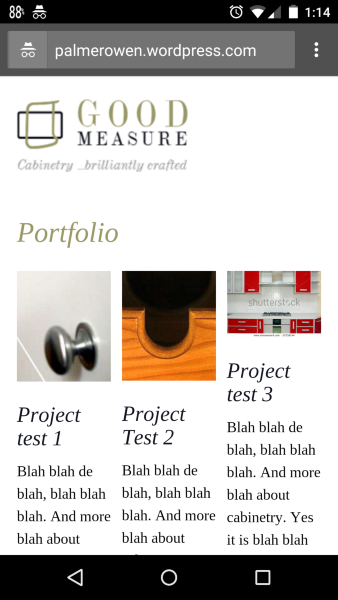
Best,
-Alex G.
-
-


- The topic ‘How can you add a portfolio project on theme Capoverso?’ is closed to new replies.
 WordPress.com Forums