

how do excerpts specifically work with Hemingway theme? I have clicked on excerpts but it is not sh
-
On one of my static pages I wanted to add an excerpt to read more on the page… I cannot seem to find if Hemingway theme allows excerpts on pages, just home page or archives. Can you help me?
The blog I need help with is: (visible only to logged in users)
-
Hi Rita,
Excerpts (and other splits, like More tags) are only used when another source is calling for information from that page or post. Hemingway has no instances where it would call for an excerpt of a static Page.
It sounds like you want someone visiting a static page (like http://ritamayell.com/about-me/) to see only the first paragraph or so, then “Read More.” And if they click Read More they’ll see all the content on the page. Hemingway wouldn’t support this kind of functionality.
A workaround you could implement would be the following. For the sake example, I’m going to use your About Me page.
- Create a new page
- Make it a child page of your original About Me page
- Copy the body from your original About Me page using the Writing Helper
- Publish that page, and note the URL
- Edit your original About Me page
- Remove everything from your page’s body but leave an excerpt/introduction paragraph
- And the text Read More in a new paragraph, and hyperlink that text to the URL of your new child page with all the About Me content
- Edit your Menu so that the child page does not appear in your navigation.
The only downside to this workaround is the reader is actually brought to a new page when clicking Read More, it’s not hidden/unhidden with an interactive feature on the same page.
Best,
-Alex G.
-
Thanks Alex. No wonder it was not working. My goal was to take my “post” pages and reduce them into summaries instead of complete posts. I had read that Hemingway theme allowed that but when I followed the direction, it did not work. So what you are confirming is that it only works when being used by another source like LinkedIn or another. Thanks
-
Alex,
Can you help clarify something for me. I am new at blogging— less than an month. I read that Hemingway allows for excerpts on your post but what you are saying it only does that on the posts from another source. SO if I am trying to show only summaries of my post rather than complete posts, I can’t?? Thanks.
-
Alex,
You mentioned “static pages”. I am desiring to summarize my home page- posts. Would that make a difference?
http://en.support.wordpress.com/splitting-content/excerpts/
This is what I read and Hemingway is supposed to allow for this…
Thanks. -
Hi Rita,
My goal was to take my “post” pages and reduce them into summaries instead of complete posts. I had read that Hemingway theme allowed that but when I followed the direction, it did not work. So what you are confirming is that it only works when being used by another source like LinkedIn or another.
For Posts, you can definitely create excerpts in Hemingway and only your excerpts will display until someone views any one post.
Any Posts page or Category Page — anywhere that lists posts — will display only the excerpt. Then when a reader clicks through they’ll see the full post content. You can do this by either creating manual Excerpts or using the More tag.
This however, is less relevant for Pages. Your initial request was regarding a static Page, not Posts. Hemingway doesn’t display lists of Pages (or their excerpts) the way it does with Posts. Readers only view the static Page itself, the same way as if they clicked through an excerpt. In that way, excerpts don’t really serve any use for Pages.
But for Posts, you can certainly use excerpts.
Does that clear it up at all?
-Alex G.
-
no. I have followed the directions and unfortunately when I publicize it continues to reveal entire post. Sorry being new I am still learning the lingo. So I add an excerpt in box and make sure options with excerpts are checked but it shows entire post. The same with read more. I type and add read more tab. It looks perfect—the lines with read more but when I publucize it reverts to showing full post. What could be wrong? Thanks.
-
Hi Rita,
I just loaded up a test site with the Hemingway-Rewritten theme. I also couldn’t get the Posts page to accept an Excerpt, so I apologize for that misunderstanding. However, the the More Tag does appear to function correctly:
(Post Editor, more tag implemented)
(Post excerpt appears on homepage)
(Full post appears on post page)When you implemented the More tag, were do you doing it similar to the screenshots above? Looking into your posts I didn’t see More tags implemented.
Best,
-Alex G.
-
Alex,
Here is what I did for More tags. I opened up a new post and when it came to the copy in which I wanted to separate, I added “the more tag” and in the copy it separated it out with a divider BUT when I hit publicize it showed the entire post not what had been manually divided. Not sure why… Unfortunately when I was “testing” this I kept publicizing new posts that went all over facebook, LinkedIn and Twitter. UGH. A newbie for sure! I have read everything and tried it so I am not sure what I may be doing wrong. Are their any other settings that need to be checked I have missed?
Thanks.
Rita -
Alex,
I just viewed your screen shots. And your screen shot of when writing the copy prior to publicize is exactly what mine look like but when I hit publicize mine do not publish your second screen shot but the entire post. That is what has been so frustrating. I am going through the steps but it is not translating or carrying over.. any other buttons or settings that I have missed?
-
Hi Rita,
Would you create a quick test post like I do in either of these videos? These are about 1 minute long, but show all the steps necessary to implement a post with the More tag.
Using the More tag in the new post editor
Using the More Tag in the /wp-admin/ editor
In that video, I disable Publicize, create a post with a more tag, then view the post with its excerpt in the home page listing.
If you make a test post following those same steps, would you then send me a link to that post? I just don’t see a More tag implemented on any of your current posts.
Best,
-Alex G.
-
Yes of course. I have some work meetings but will as soon as I get home late this afternoon. You have been and are so gracious. I soncerely appreciate your assistance.
-
https://wordpress.com/post/77989274/258
This post was done exactly as you illustrated and in the beginning looks right until published privately and then again it shows what you see- the entire post. Thanks for your insight.
RIta -
-
Hi Rita,
Thanks for making that post. That post’s More tag is behaving correctly. Check out your home page:
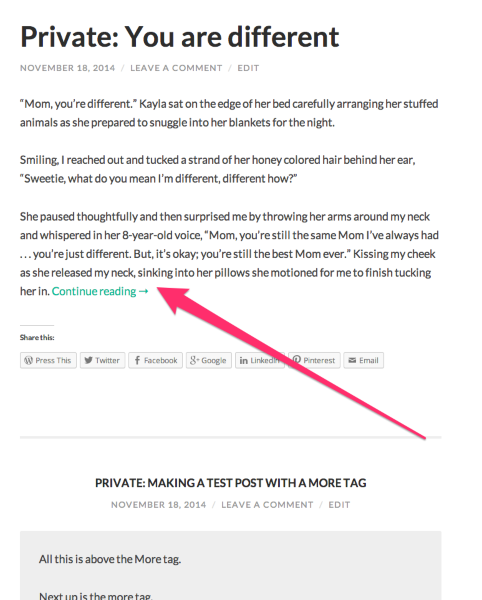
That’s the More tag in action.
The post’s page will always show the full post; with or without a More tag.
All that changes is what is displayed when there is a list of multiple posts.
In this case, only the portion above the More tag is displayed on your home page. Once you click through, the whole post is displayed.
This is the function of More tags and Excerpts.
-Alex G.
-
Ok Alex you are going to think I am nuts.. After I posted it showed the entire post and not the excerpt… did I not give it enough time? Now it is working…
-
-
Hi Rita,
I don’t think you’re nuts, but that More tag is working correctly. I’m probably just not being clear enough, so I’ll try explaining this a different way. :)
That link you’re sharing (http://ritamayell.com/2014/11/18/you-are-different/#more-258) is to the post’s page. At that link, the post will always show in its entirety. It’s supposed to do that. It’s where the content lives, so the content will never be hidden there.
The way excerpts and more tags work is that they only display a portion (or custom excerpt) when you view a list of several posts. That’s the only time the More tags or Excerpts do anything.
Like this list on your home page:
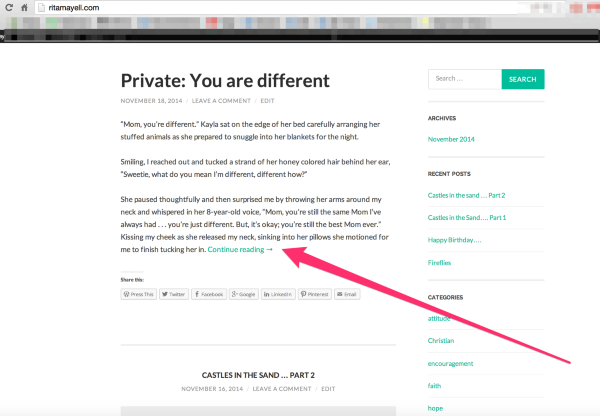
See how only the portion above the More is showing? Then it says “Continue Reading” with a link where the more tag was? That is the More tag working. Excerpts work in a very similar way.
The post page is always going to show the entire post, it’s not going to hide the portion and allow you to click to unhide it.
If you wanted to hide content on that post page, you’d need to either use a self-hosted website where you could add interactive code, like JavaScript. We don’t allow users to implement their own JavaScript here on WordPress.com for security reasons outlined here. You could theoretically make this happen with a workaround like I outlined in my first reply in this thread, but it would be a lot of trouble with not much to gain.
Best,
-Alex G.
-
Alex,
You are the best… I think I have it now. Whew… Ok, so what I uncovered- thanks to you, is once I have something posted it will reveal the entire post until I hit the “home” button which moves me into the “multiple posts” which is where the “the more tag” is displayed. As long as the “more tag” works, I can live without excerpts. You have been great. Unless you have something to add, I think we can close out this question out.
Have a great Thanksgiving and again thanks again for your patience, thoroughness and technical expertise.
Rita
-
Hi Rita,
Glad it makes sense now. :)
I’ve got nothing to add! Just let us know if you have more questions later on.
You have a great Thanksgiving as well.
Best,
-Alex G.


- The topic ‘how do excerpts specifically work with Hemingway theme? I have clicked on excerpts but it is not sh’ is closed to new replies.
 WordPress.com Forums