

How do I add a space
-
Always have trouble adding a space after a </div>…. the always seems to disappear.
The blog I need help with is: (visible only to logged in users)
-
-
-
-
THE SAME CODE STARTING WITH & THAT’S SHOWN WITHIN THE LINK YOU OFFERED. THE SAME CODE I HAVE BEEN USING SINCE 2012.
-
< >
Put here between code tags (the code button).
THE SAME CODE STARTING WITH & THAT’S SHOWN WITHIN THE LINK YOU OFFERED. THE SAME CODE I HAVE BEEN USING SINCE 2012.
Please do not write everything capitalized, I understand everything without the use.
-
-
-
-
I give up, what is the code button?
This is the code button:
https://cloudup.com/c4tWe3wXUdlAgain. In your next response:
a) click on the code button
b) copy & paste all the code you are using to generate extra space
c) click on the code button -
-
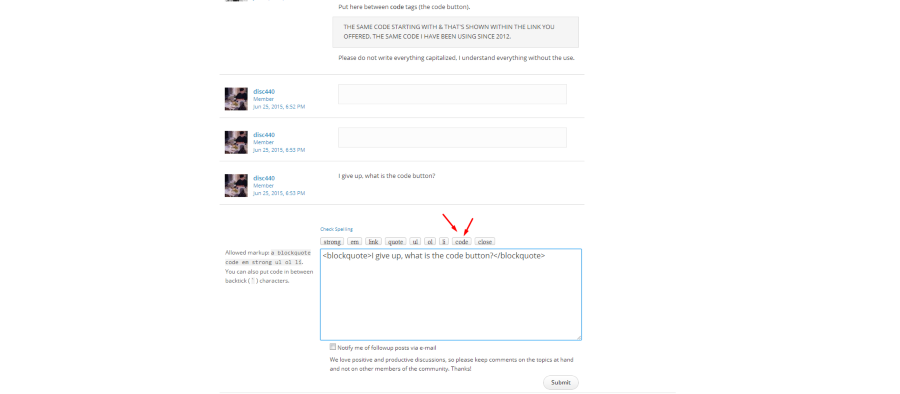
You have copy my links! Why?
This link https://cloudup.com/c4tWe3wXUdl it’s just a screenshot to understand where the button is.You can see the button above the box that you write the messages: there are 9 buttons there (strong, em, link, quote, ul, ol, li, code, close).
Then,
a) click on the code button
b) copy & paste all the code you are using to generate extra space
c) click on the code button again
d) click on Submit -
-
-
And it didn’t work….again!! Just forget it please.. I will simply add a horizontal line to separate the two.
-
Try with the code mentioned in the support page:
” ” without the ” “:
https://en.support.wordpress.com/advanced-html/#extra-line-breaksOr try this: put
after the div tag. -
Oops!
See the https://en.support.wordpress.com/advanced-html/#extra-line-breaks
for extra spaces/line breaks


- The topic ‘How do I add a space’ is closed to new replies.
 WordPress.com Forums