

how do I add Featured Content Slider to Zuki theme
-
I just purchased Zuki theme. When it converted the new theme to my blog, it looks nothing like what the Demo showed. I am trying to match it up to the demo, but none of the Widgets seem to work, other than adding footers.
In particular I want to add the Featured Content Slider on Home page, just like in Zuki Demo.
I also want to add Latest Highlights same as in Zuki Demo.For some reason, I can’t get anything to show up and I don’t actually know where to find the Featured Content Slider in order to add. Help please :)
The blog I need help with is: (visible only to logged in users)
-
Hi Claire!
Have you taken a look at the Zuki support guide?
https://wordpress.com/themes/zuki/support/
It will help you set up all the features you mentioned.
Take a look and if you have any questions feel free to reach out to me!
In addition, since you purchased a Premium Theme, you are able to receive direct support from the theme authors. Please go here to speak with one of the theme authors:
http://premium-themes.forums.wordpress.com/forum/zuki
Cheers!
-
Thank you Grace for your help – I watched the video and figured out how to add the slider. Now I see this huge space underneath and I don’t know how to fill up the space.
Also, how do I make my header Canapes and Chocolate, without making ALL headers larger?
Lastly, how do I add posts in a Content area other than Recent Posts. All i seem to be doing is adding in the 4 most recent posts in all areas of the static front page.
Appreciate any help. Thanks!
-
Grace, I don’t think I was clear in my previous post.
1. Would like to make my header Larger
2. How do I pick and choose specific posts that I want to feature in the Front Page Content Two.
3. How do i use all of the width – would like to place some icons across the width of the front page.Thank you again!
-
Hi Claire,
1. Would like to make my header Larger
You can do this if you edit CSS. Please go to Appearance > Customize > CSS and add this:
#site-header .site-title a {
	font-size: 25px;
}

.wf-active #site-header h2.site-description {
	font-size: 15px;
}
Lastly, how do I add posts in a Content area other than Recent Posts. All i seem to be doing is adding in the 4 most recent posts in all areas of the static front page.
In the Zuki support guide it states:
You can use Zuki’s Post widgets in any Front Page and sidebar widget areas and set the number of posts to be displayed in the widgets. The Recent Posts widgets will look best if you include Featured Images for all your posts. Post widgets can be filtered by category, so you can feature different post topics on your front page.
If you look at your Front Page – Post Content 1 widget, you set it to only have 4 posts as seen here:
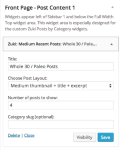
Increase that number and you should have more posts there.
Now I see this huge space underneath and I don’t know how to fill up the space.
I did see this, but was unable to replicate this issue on my test site. I have reported this to the theme developers for further investigation.
-
Hi Grace,
1. I copied and pasted your code into the CSS box, but it removed the slider feature, moved all headers to far left, and changed color of the title of my blog. So it didn’t work.
2. I understand the Post Content 1 widget and am happy with my four posts under the header Whole30/Paleo posts. What I want to change is the next two sections that are lablled: Featured Posts and Recent Posts. I want my middle section to look the same as the Middle Sections on the Zuki Demo. What I can’t figure out is how to pick and choose specific posts – You say “widgets can be filtered by category” but I don’t know how to do that and don’t know how I then insert the specific posts in either of those areas.
Thanks!
Claire
-
Me again,
So I copied just the first part of your code and inserted into CSS and increased font size from 25px to 35px. And it looks better. Had to remove the tagline as it started to wrap.Is there a way to change the color of the header and also the page headers so they are all in a dark green color?
-
In order to the get Creative section in the demo, please use this widget:

Add the Medium Recent Posts and then select the Category slug you want to use.
You can pick a category for each post when you are editing the post. You can read more about this here:
Is there a way to change the color of the header and also the page headers so they are all in a dark green color?
Yes, you can do this with CSS as well. Remove the original CSS you had, and add this:
#site-header .site-title a {
	font-size: 40px;
	color: #CSS COLOR VALUE;
}

#site-nav ul li a {
	color: #CSS COLOR VALUE;
}
As for the color you can choose what you want from here:
http://www.w3schools.com/tags/ref_colorpicker.asp
Please replace the color value you want with where it says #CSS COLOR VALUE. Make sure the # is in front.
-
Hi there,
For the space under the slider, can you please try resizing your Featured post images in the Featured Content Slider to be 1200×800. That is the recommended size in the support page:
https://wordpress.com/themes/zuki/support/
Let me know if that doesn’t get rid of the space.
Cheers!
-
-
I see! So I see that this post has a smaller featured image (731 × 614 px):
Can you make sure that featured image is 1200×800 px and see if that changes it?
Thank you!
-
Hi Grace,
Can you tell me how to remove the double images. Under Blog, some posts there is a large image (120×800) and then right underneath there is a smaller same image that I dropped into the post when I created the post originally (see the 2nd most recent post called Baked Eggs).
Not sure what I have done to create this.
Thank you for your help!!
-
Hi Claire,
It looks like you added the image as a Featured image and also within the post itself. Remove the one in the post and you will just have the large image at the top. Here is the link to edit the post:
https://ced1213.wordpress.com/wp-admin/post.php?post=4872&action=edit


- The topic ‘how do I add Featured Content Slider to Zuki theme’ is closed to new replies.
 WordPress.com Forums