

how do I add plugins to my menu
-
I’m trying to add the “expand + collapse funk” and can not find the plugins menu on my dashboard. Suggestions?
The blog I need help with is: (visible only to logged in users)
-
Howdy!
It is not possible to install plugins on WordPress.com, for security reasons. Plugins can only be installed on self-hosted WordPress.org blogs.
If you are wondering how WordPress.com differs from WordPress.org, this support article explains the distinction:
WordPress.com has a lot of built-in features that were inspired by popular plugins. Chances are, the feature you are looking for is already there! What were you planning to use a plugin for? I’d be happy to look for a workaround using the functions already available.
Let me know. :)
-Alex G.
-
Sorry for the confusion… I’m actually asking about wordpress.org. Can you help me figure out how to install it on the wordpress.org site?
-
Hi there,
Ah, okay. This support forum is meant only for sites hosted on WordPress.com — since we do not have access to self-hosted site files we cannot troubleshoot those issues here.
However, the Plugins menu for a self-hosted dashboard should appear between your Appearance and User settings:
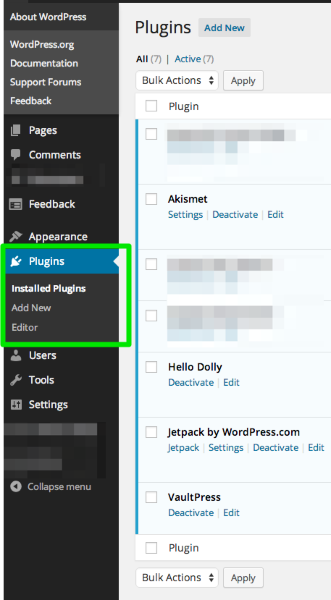
You can find steps for installing plugins in the WordPress.org documentation:
http://codex.wordpress.org/Managing_Plugins#Installing_Plugins
Make sure to read both the “Automatic Plugin Installation” and “Manual Plugin Installation” the steps to use are based on your situation and the plugin you’re installing.
In the future, the best place to look for help with self-hosted sites running WordPress.org software are the Codex (documentation) and WordPress.org Support Forums:
-Alex G.
-


- The topic ‘how do I add plugins to my menu’ is closed to new replies.


 WordPress.com Forums