

How do I change grid page template from automatically putting 3 in a row to 2?
-
I am using the theme Pique. It is a one scroll site layout. I made one of the panels gridded (parent page: MEET), but I only have two child pages for it to grid. However, the grid page template automatically grids three in a row and can hold up to 12. What CSS code would I use to override this and change it to 2 (and also spread the two grid sections evenly across the page)? Where would I put this code?
-
If you’d like to make the two posts in the Meet section each take up half the width, you can add this to your custom CSS:
.pique-grid-three article {
    float: left;
    width: calc((100% - 80px) / 2);
}
Let me know how it goes.
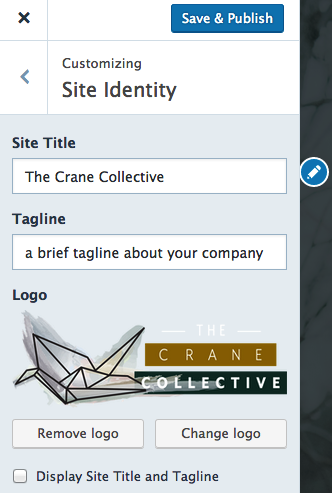
As a side note, I noticed your site is missing a site title. I would recommend you add one, so your site will have a proper browser title tag, which is important for both search engines and folks navigating your site in a browser. If you don’t want it displayed on the front end, just keep the box next to “Display site title and tagline” unchecked.
-
This worked!! Thank you! The only problem is that it messes up the formatting of the blog posts section underneath. That section holds three posts (and I would prefer to have it hold three posts and no less). In reformatting the Meet section, it reformatted the blog posts panel so that now it’s not aligned evenly. Could you help me with this also?
-
Ah, sorry about that. Could you please remove what I gave you before and try this instead:
.post-65 article {
     float: left;
     width: calc((100% - 80px) / 2);
}
Let me know how it goes!
-
That worked perfectly, thank you so much! I have a couple other questions that would be amazing if you could help me fix…
1) How do I get my theme to be full page? I thought it was when I was looking at it from my 13″ Mac, but then I saw it on a 20″ desktop screen and you can see the background color I chose (gray). I chose the background color thinking it wouldn’t matter since I thought my theme was full page and would adjust with screen width, but apparently it doesn’t.
2) I really want to use ONE picture of my partner and I together (the picture on there right now is a filler) and have the top half of the picture be on the first panel and the second half be on the second panel (about section). I’ve uploaded the same picture for the home and about pages, and sometimes it looks like it is already in the way that I want, but on other screens the picture is duplicated.
3) How do I add buttons that look exactly like the ones on the Pique theme live demo? They gave me a code that’s supposed to make it look like that, but there are a couple small differences:
– the words on the first blue button are dark, not white
– the words are italicized / slanted -
3) How do I add buttons that look exactly like the ones on the Pique theme live demo? They gave me a code that’s supposed to make it look like that, but there are a couple small differences:
– the words on the first blue button are dark, not white
– the words are italicized / slantedThe words are italicized because of this CSS in the theme that applies to the first paragraph within the first panel:
#pique-hero .pique-panel-content .entry-content p:first-of-type {
    font-size: 2em;
    font-style: italic;
    text-align: center;
}
In the demo, that first paragraph consists of the text “If your cafe is your bread and butter, Pique is going to be your jam.”
To remove the italics on your buttons without having to add another paragraph before the buttons, you can add some CSS to both buttons:
.button, .button-minimal {
  font-style: normal;
}
The text on the first button looks white to me:

Are you seeing something else?
1) How do I get my theme to be full page? I thought it was when I was looking at it from my 13″ Mac, but then I saw it on a 20″ desktop screen and you can see the background color I chose (gray). I chose the background color thinking it wouldn’t matter since I thought my theme was full page and would adjust with screen width, but apparently it doesn’t.
Pique is not a fluid theme by design – it has a fixed width. Redesigning the theme to be fluid is beyond the scope of what we can assist with here as that would be a major project.
2) I really want to use ONE picture of my partner and I together (the picture on there right now is a filler) and have the top half of the picture be on the first panel and the second half be on the second panel (about section). I’ve uploaded the same picture for the home and about pages, and sometimes it looks like it is already in the way that I want, but on other screens the picture is duplicated.
Could you please start a new thread for this question?
If you have additional questions beyond these, could you please start a new thread rather than continuing to add to this one? Thanks! -
Thank you very much for your help. I have started a new thread for my second questions in my previous reply.
-
-
I have another question:
I am using the Pique theme and I don’t like the font it defaults to for the footer widgets, footer menu and footer credit. How do I change the font for these three parts without changing the font anywhere else on the whole website?I would like to replace with Gotham font. If not possible, I would like whatever sans-serif font is used throughout the blog. Could you please assist?
-
I’m also running into an issue with my blog posts…
When I upload a featured image to a blog post, it makes it the background for the panel on the blog page, which I like. However, this then turns the feature image into the header on the individual blog post’s page, which I do not want. But when I delete the featured image, it makes the panel blank on the blog page.
https://cloudup.com/cYTv5H7hJXd
How do I keep the feature image for the panels on the blog page, without it become the header for individual blog posts? I really like the header on the blog page (succulents with my logo on top), and I would like to keep that my header on individual blog post pages as well. How do I achieve this?
-
Please start separate new threads in the Themes forum for your other questions, to allow us to help you better. Thanks!


- The topic ‘How do I change grid page template from automatically putting 3 in a row to 2?’ is closed to new replies.
 WordPress.com Forums