

How do I change the appearance of my site?
-
How can I change the appearance of my site?
I want to be able to change, add, remove layout options to whatever I like for each page. Is there a way to do this?The blog I need help with is: (visible only to logged in users)
-
Hi there,
You can indeed adjust the appearance of your site. Of course, it depends exactly WHAT you want to do…I’m not entirely certain which options you’d like to add/remove.
Here are a few documents which will walk you through the process:
How to configure your site:
http://learn.wordpress.com/get-configured/
(I’ve sent you straight to a specific area of the document above, but I suggest perusing it for other details you might like to learn.)How to setup the Twenty Eleven theme:
https://wordpress.com/themes/twentyeleven/How to adjust your page attributes:
http://en.support.wordpress.com/pages/page-attributes/If you have questions along the way, let me know specifically what you’re trying to accomplish and where you’re getting stuck. I can help further! Thanks much.
-
Hello, thanks for the tips. What I want to be able to do is add boxes and change the layout of individual pages (to look a bit like the Oxygen demo). Is it possible to do on this theme, or is it better to just change the theme?
I tried changing to Oxygen theme but couldn’t see the option to add a row of images/boxes of text below the main header and intro text. sorry, finding wordpress very convoluted.
Is it possible also to move my domain to yola if I don’t get along with wordpress, and can I get an email address with my domain @briidge-coaching.com ?
many thanks -
Hi there!
What I want to be able to do is add boxes and change the layout of individual pages (to look a bit like the Oxygen demo). Is it possible to do on this theme, or is it better to just change the theme?
I suspect that it might be easier in this case to switch to the Oxygen theme and customize from there since that is the look we’re going for. Doing this in the Twenty Eleven theme might get a bit tough!
I tried changing to Oxygen theme but couldn’t see the option to add a row of images/boxes of text below the main header and intro text.
Are you referring to the row of images shown here?
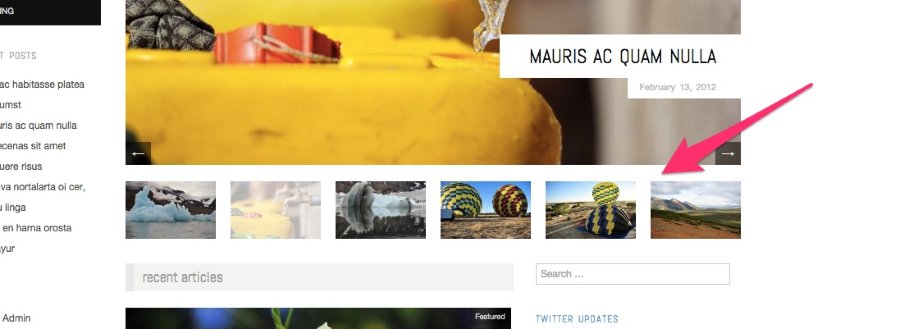
If so, did you try following the instructions here under “Showcase Page Template”?
http://theme.wordpress.com/themes/oxygen/
I’m happy to help you if you get stumped at a certain step!
Is it possible also to move my domain to yola if I don’t get along with wordpress?
Certainly! You can transfer your domain to Yola if you would like following the instructions here:
Alternatively, if you would like to keep the domain at WordPress.com, but still use it with Yola, you can map it following the instructions here:
With that second option, you would still need to remember to renew the domain at WordPress.com each year in order for it to work correctly.
Can I get an email address with my domain @briidge-coaching.com?
You have two options regarding creating a custom email address for your domain.
- You can setup email forwarding following the instructions here:
http://en.support.wordpress.com/email-forwarding/
In this scenario, email to your custom address ((email visible only to moderators and staff) for example) would be forwarded to an address you already own (like a Gmail address for instance).
- You can add a custom email address through a third-party as explained here:
http://en.support.wordpress.com/domains/add-email/
In this scenario, you would be setting up a separate address with a separate inbox
Please let me know if you have any follow-up questions!
- You can setup email forwarding following the instructions here:


- The topic ‘How do I change the appearance of my site?’ is closed to new replies.


 WordPress.com Forums