how do i change the caption on a Zemanta photo
-
How do I change the caption on a Zemanta photo? I can lose the caption but then I lose the photo credit. I can get a “hover” caption but I would like it to show up under the photo with the credit.
The blog I need help with is: (visible only to logged in users)
-
-
I don’t want to remove the credit. I want to change, or even add to, the caption while leaving the credit in place.
-
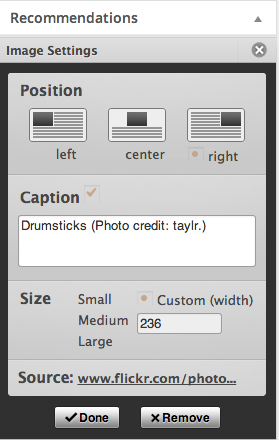
When you click on a Zemanta image, you will get a box like this:
https://i.cloudup.com/mPC4TyIpDu.pngYou can edit the caption text (in the above example, the word “drumsticks”) but leave the photo credit in the caption.
-
I see it now. I have to scroll down to the image settings after I click on the photo. It isn’t all visible at once. Fantastic! I have just successfully changed a caption and left the Wikipedia credit in place. Many thanks.
-


- The topic ‘how do i change the caption on a Zemanta photo’ is closed to new replies.
 WordPress.com Forums