

How do I change the menu in the Sketch theme to show always under the header?
-
Hi! I am transitioning into the “sketch” theme and am having trouble understanding the menu options. I would prefer a menu at the top under the header image, as is shown in the example of the “sketch” theme, rather than the menu in the upper right hand corner that is only shown when clicked on. Is this a premium upgrade option only? Thanks! I’m at jesslovespete.com
The blog I need help with is: (visible only to logged in users)
-
Hi there,
I just took a look at your site and I’m not sure I understand what you’re going for! The menu on the demo page for sketch looks like so:
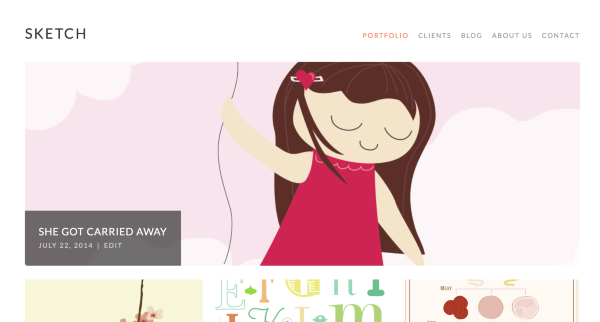
And your version looks like this:
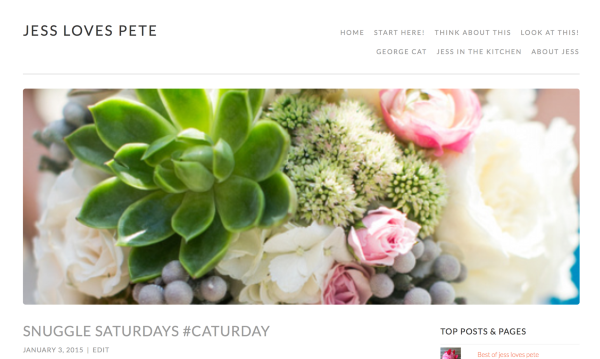
Was this the look you were going for? If not, could you send me a link to the page that you wanted your site to look like?
Thank you in advance!
-
Hi!
Thanks for helping me- I am not entirely sure what is happening- the screenshot that you showed of my blog is exactly how I want it to appear (I would prefer the list to continue all across the screen in a single row instead of listing in two rows, but I don’t mind if that’s how the theme works)- unfortunately it does not appear that way on my macbook pro laptop. Instead of seeing the menu option words listed out- “home/start here, etc.” in the upper right corner of the site there is a small rectangle with three lines and the word “menu”, and when I click on it, the options “home/start here, etc.” can be seen. It seems more like the mobile site menu should be . . .
After checking my site on a PC using internet explorer, I saw the site as shown in your screen shot. Is this an apple issue of some kind? I wouldn’t think that should make a difference . . .
Hope that makes sense.
thanks!
-
Ahhh! No, it isn’t an apple issue (I’m on a Macbook Pro myself). It’s a browser size issue. Your theme is responsive, meaning that if it detects a narrow browser it rearranges itself so it looks as nice as it can in the space allowed. So if you open your browser up wider then it will display the menu items as you’d like them to be shown!


- The topic ‘How do I change the menu in the Sketch theme to show always under the header?’ is closed to new replies.
 WordPress.com Forums