

How do I change the size of post images in blog page
-
good morning!
how can I turn my post images into thumbnails on the blog page?
The blog I need help with is: (visible only to logged in users)
-
Hi there,
I took a look at your site, and your front page (blog page) already appears to be using a theme that generates small thumbnails automatically. Did you need to change the images size on a different part of your site?
-
hi Jerry,
I want to change the image size on the main blog page.
-
Thanks for clarifying. Because those images are ones you have inserted directly into the page (as opposed to ones placed there automatically by the theme) it’s not practical to resize them with CSS.
However, you can edit your blog posts to change the size of the image directly, replacing the large ones there currently with smaller images, using the “Thumbnail” size.
That size is visible in the dropdown here, when you first insert the image:
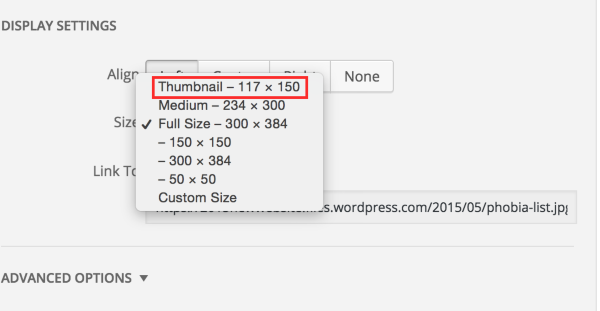
You can also choose one of the square sizes, like 150×150 until you find a size you like.
-


- The topic ‘How do I change the size of post images in blog page’ is closed to new replies.
 WordPress.com Forums