

How do I close the page "Edit blog I follow"?
-
How do I close the page “Edit blog I follow”?
I have added a non-WordPress blog I want to follow, and it has appeared in the list below the box. What do I do now? I am stuck in the “Edit” page.
In “WordPress/Support”, is there a general rule for closing a dialog page to go back to its parent Support page? I have been dealing with it by closing the tab and re-opening it.
I am puzzled how to use the thick blue “+” signs. It seems to me that the “X” sign is for deleting an item, but what about the “+” sign?The blog I need help with is: (visible only to logged in users)
-
Hi there,
Are you referring to this box here?
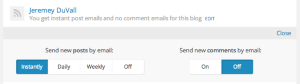
If so, you can either click the “Edit” link again or the “Close” link to close that dialogue. If you’re referring to something completely different, could you take a screenshot and upload it to your Media Library so I can take a look? Directions on taking a screenshot can be found here:
Regarding the navigation using + and x signs, I’m not entirely sure what you’re referring to. Again, could you take a screenshot and upload it to your Media Library so I could take a further look?


- The topic ‘How do I close the page "Edit blog I follow"?’ is closed to new replies.
 WordPress.com Forums