

How do I create a drop down menu?
-
Hi, I’d like to create a drop down menu but can’t figure out how to do it:( Where can I finde help for it? Best regards Jeanette
The blog I need help with is: (visible only to logged in users)
-
Hiya Jeanette. I took a look at your site and was hoping you could give me some more details. Do you want to create a brand new menu? Or were you hoping that your current menu could have drop down items beneath each heading?
Regardless, the process would start here for both possibilities:
Let me know how I can help further! Wishing you the best.
-
Hi!
Thank you for your reply. I’ve been away on holiday and therefore I haven’t replied. I’d like to use my current menu and then make the drop down beneath each heading. I will look at for link:)
KG Jeanette
-
To create a drop-down menu, first add all the pages or other content you want to the menu. You can then drag the different items around to put them in the correct order. For those you want to be a drop-down, drag them slightly to the right in a stair-step fashion and they will become a secondary drop down menu.
For example:
The Smith Family
..Dad
..Mom
..Sally
The Ford Family
..Mom
..Zach
..FluffyIn this example, the family links would be the main menu items, and the family members would be a dropdown.
You can have multiple layers by moving items further to the right, but those menus become increasingly difficult to navigate.
-
Thank you so much, I tried it out and it looked as if it was right, but when I checked it wasn’t right. How can I check that my theme can have drop down menus, perhaps that’s the problem?!?!
-
I just took a look for you, and it looks like you didn’t assign the menu as the primary menu:
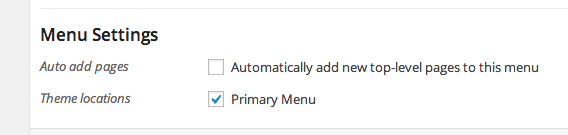
I’ve just done that for you and it’s working properly now. :)
-
-


- The topic ‘How do I create a drop down menu?’ is closed to new replies.
 WordPress.com Forums