How do I display only part of my post, with say a, "read more" option?
-
My posts are posted in full to my page, I would rather only show a small section of each post to make the user experience better. I do not know how to do this currently and thought it would be a simple fix, maybe it is so simple no one has commented on it on your forum, but I cannot find the answer?
The blog I need help with is: (visible only to logged in users)
-
Hi Scott,
Yes you are right the fix is simple!
-Open your post
-Look on the toolbar
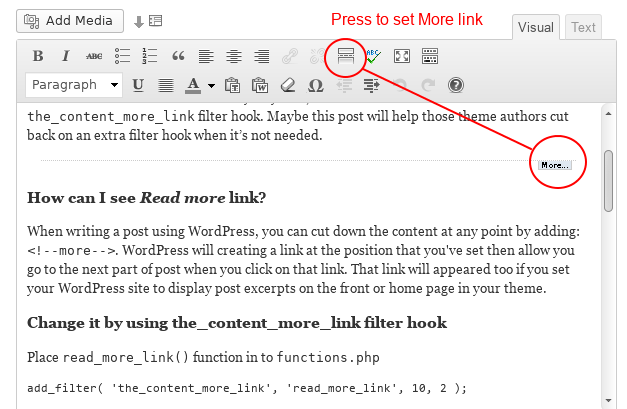
-You should see a button with a top and a bottom solid line with a dotted line in the middle.
-Put your mouse where you would like the “read more” to be and then click the above button.Here is a visual example to help you as well.
Hope this helps!
-
I’m supplementing what has been posted above.
The “summary” setting here > Settings > Reading is only for the RSS Feed and does not affect the posts.
If you want to display only excerpts on the front page of the blog followed by read more links, you can insert “the more tag” into each post prior to publication.
http://en.support.wordpress.com/splitting-content/more-tag/Alternatively, you can switch to using a theme that automatically displays front page excerpts. This is a list of active themes on WordPress.com that use the excerpt instead of full post content at this time. https://en.forums.wordpress.com/topic/theme-with-automatic-excerpts?replies=13#post-1396410


- The topic ‘How do I display only part of my post, with say a, "read more" option?’ is closed to new replies.
 WordPress.com Forums