

How do I edit social links menu on Zuki theme?
-
How do I edit the social links menu on my blog? I added my social ULRs & they work, but the defalt icons are still there. How fdo I delete those & change the wording from “Follow Us” to “Follw me” Thanks!
The blog I need help with is: (visible only to logged in users)
-
Just took a look at your social menu:
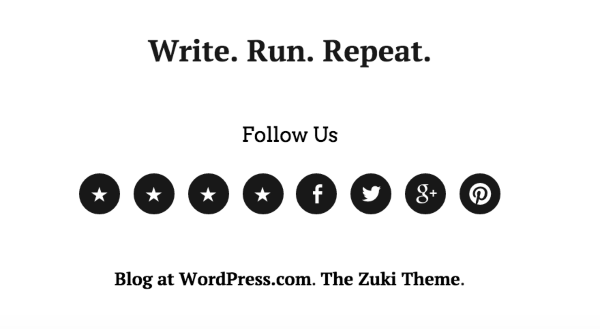
Looks like the social links menu is behaving as expected there, with the default star icon for your site links and the Facebook, Twitter, Google+, and Pinterest icons for those services.
How would you like the icons to be changed?
We use our Genericons font to create those social links items, so using some CSS I can help you change those icons to anything else in Genericons.
To change the “Follow Us” text, open up your blog’s Customizer here:
Choose the “Theme” tab, and there’s an option called “Footer Social Menu Title:”
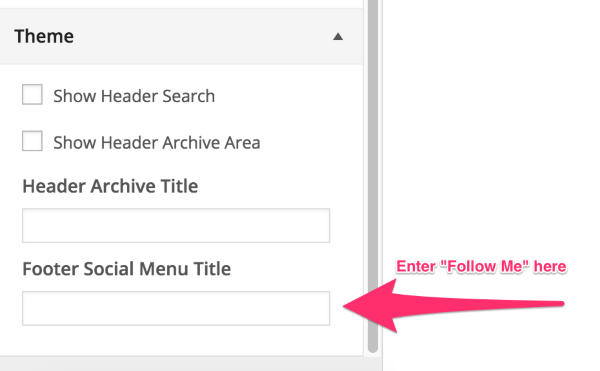
Enter in your preferred title there. “Follow Us” is just the default title when nothing is in there. You can enter “Follow Me” — or even just a couple of spaces if you’d prefer no text appear.
Let me know on your preference for those icons. :)
-
Hi Alex,
Thanks so much for your help, I changed the “follow us” to “follow me” per your instructions.
I’m good with the social media icons that are there, I just want to delete the default “star” icons that appear before the facebook, twitter, etc… Can you help me with that?
-
Oh, & I almost forgot, can I also add these black icons to the sidebar as well, that way I can get rid of the old icons I brought over from my last blog theme.
Thanks again! :)
-
Zuki can only put a social links menu in that footer location, widgets like you currently have are the only way to add stuff to your sidebar.
I just want to delete the default “star” icons that appear before the facebook, twitter, etc… Can you help me with that?
Are you wanting to delete the Stars, or change the stars to something else? To delete them, you’ll need to remove those menu items. Visit your menu settings here:
https://monicabruno.wordpress.com/wp-admin/nav-menus.php
Make sure your Footer Social Menu is selected to edit. Delete the “Front,” “Blog,” “About Me,” and “Rachel’s Folly” items. Save menu.
Changing the Star icons is a little different:
Copy and paste this code into your CSS Editor. (Requires the Premium plan, which you have.)
#menu-social li a::before, #footer-social-nav ul li a::before {
content: 'f408';
}
Visit http://genericons.com/ and pick out what icon you’d rather have than the star. Look for its code and replace ‘f408’ with your preferred icon’s code.
For example, to use the WordPress icon instead you’d use:
'f205'To use a Link icon, use:
'f107' -
-
Happy to help. :)
By the way, love your “Write. Run. Repeat.” tagline — I’m gonna share that with my wife who is also a runner and blogger.
-
Hi there,
Do you know if I can add a custom header image to the front of my website?
It’s the Zuki theme. If I can add a custom header, what dimensions do the image need to be & how do I get it onto the page?Thanks so much!
-
Hi there!
The About page for Zuki mentions a Custom Header, but I believe this is out of date (or possibly more accurate on self-hosted sites). Zuki actually makes use of our Site Logo feature:
Site Logos get loaded in to the same space as your Site Title and Tagline text, so most folks choose to either use the Logo or the text, but rarely both.
The dimensions for Site Logos are flexible because the header container will actually expand for the logo — but if you choose a Site logo 1200 x 70 px it will act very similarly to a custom header image. The biggest difference is that the Site Logo image will act responsively, so if the image contains text it will look incorrect on smaller screen sizes.
Experimentation in the Customizer is really the best way to try it out and see what the theme does.
-
Great, I think I can figure something out for the header….
Now I have another question:
How do I add a Pinterst widget onto my side bar … I specifically would like to add an image of one of my pinerset boards. Also, how do I add a pinterst “pin” option to my blog post so others can pin my featured image with a link that goes directly to my post?
Thanks again for all you help!
-
Hi Monica!
Right now we have Pinterest integration with Embeds but embeds won’t work in widgets, only pages or posts. It’s in the developers queue to support a Pinterest widget, but I’m not sure when it will be available. I’ll let you know here whenever it is.
You could “cheat” this by taking a screenshot of your pinterest board, adding that to an Image widget, and change the link-to URL of the widget to your pinterest board.
Also, how do I add a pinterst “pin” option to my blog post so others can pin my featured image with a link that goes directly to my post?
Visit this page:
https://wordpress.com/sharing/buttons/monicabruno.wordpress.com
Click on “Edit Sharing Buttons” then in the menu that opens up, click the Pinterest button. Save changes.
Now everywhere that sharing buttons are allowed, that Pinterest button will be there. A reader can click on it, choose which image they prefer as their thumbnail (if you have a featured image selected it will always be in the options) and then pin it to their Pinterest board.
While on that page if you choose the “Official Buttons” button style, it will also turn on the ‘Pin It’ hover option for all your photos, allowing users to Pin that image instead of just the post.
-Alex G.
-
Hi Alex,
I was ale to do most of what you said, with the exception of cheating the widget. I’m technically challenged (as I’m sure you already noticed) & I can’t figure out how to get a picture of one of my boards. No matter, just let me know when you guys have a Pinterest widget available!
Thanks again!
Monica
-
-
Good morning Alex,
Here’s another question for you … How do I add Pinterest Article Rich Pins to my Website and blog post?
The instructions say that if you’re technically challenged you’ll need to ask for help to set it up …
Here’s the link http://bit.ly/1wXCGXD
Thank you!
-
Hadn’t heard of this feature yet, thanks for the heads up! :)
Since it requires having meta tags on your site this is something we’ll need to configure on our end. We already have a spot for the meta tags of Pinterest Verification, but these need a different set of meta tags beyond that.
I’ll submit a request to our developers for this as well. :)
-
-
Alex!
I’m stuck again … Shocker! I just signed up for the Amazon Associates Program for my novel, Rachel’s Folly. I have no idea how to add the Product Link to my website (preferably the sidebar) … The Amazon Product Link page says to copy the HTML and paste the code to the webpage …
Here’s the code for the image & text:
<iframe style=”width:120px;height:240px;” marginwidth=”0″ marginheight=”0″ scrolling=”no” frameborder=”0″ src=”//ws-na.amazon-adsystem.com/widgets/q?ServiceVersion=20070822&OneJS=1&Operation=GetAdHtml&MarketPlace=US&source=ac&ref=tf_til&ad_type=product_link&tracking_id=monibrun-20&marketplace=amazon®ion=US&placement=1620157527&asins=1620157527&linkId=LMOXQWKR2T4HX2XG&show_border=true&link_opens_in_new_window=true”>
</iframe>Any ideas?
-
Hey Monica!
Amazon Associates is great, we have a lot of bloggers that earn income through them. :)
Since their embed codes use the iframe tag, they won’t work on our site. But they should also be able just the referral links without any embed code:
https://affiliate-program.amazon.com/gp/associates/promo/buildlinks.html
Our affiliate link policy is that you can use these links with any text, but not as link-to URLs on images. When attached to images, affiliate links are considered advertising and are automatically scraped.
So here’s what I’d suggest. :)
- Go to Amazon and create the product link without a banner, etc
- Create a text widget for your sidebar
- Add a your Amazon affiliate link to some text like “Get the book here!” (how-to)
- Add an image above/below the link that doesn’t link to Amazon Associates program.
You can either add the image in a separate Image Widget, or add it to the same Text Widget using a bit of HTML:
(How-to: Adding Images in HTML)
That way your amazon link and image will both be working, and hopefully you’ll get some good clicks. :)
-
Hi Alex!
Happy Friday! Ok, that’s a lot of info on the Amazon Associates thingy, so I’ll need to read thru everything & try it out this weekend.
Also, I’m trying to get my custom header onto my site, but it doesn’t seem to matter what size I make it, it will only go about half way across the page. Here’s the logo I’m trying to use:

And, one last thing … any word on the Pinterest Article Rich Pins?
Ok, that’s it. Thanks again for all your help! :)
-
Gotta love Friday. :)
For the Site Logo, add that image back in, then also copy+paste this code into your CSS editor:
#site-header{
	width: 96%;
	max-width: 100%;
}
Should be a lot more what you’re looking for. :)
No updates on the Pinterest Rich Pins right now, sorry!


- The topic ‘How do I edit social links menu on Zuki theme?’ is closed to new replies.


 WordPress.com Forums