

How do I embed video?
-
Cannot ended video. Have always just posted the url in my Android app post editor and the YouTube screen automatically appears in the published post. Now they just appear as a hyperlink.
The blog I need help with is: (visible only to logged in users)
-
Hi there,
Looking at your latest post, it appears as though the YouTube links are added as hyperlinks within the text as you mention:
https://dalecooper57.wordpress.com/wp-admin/post.php?post=2777&action=edit
In order for the embed to work, the links will need to be entered on their own line rather than hyperlinked within the text. Can you try changing one or two links and see if the embed begins to work?
-
Those are hyperlinked, because I haven’t been able to get the normal player to embed recently. If you look back at older posts (the ’80s music posts for instance) you’ll see that it used to work fine.
I’ve not changed anything I do, just copy the code straight onto the post editor, only it now doesn’t seem to work. -
Hi there,
I copied a snippet of your latest post and posted it into a test blog to try this out. I was able to get the YouTube video to embed correctly as shown here:
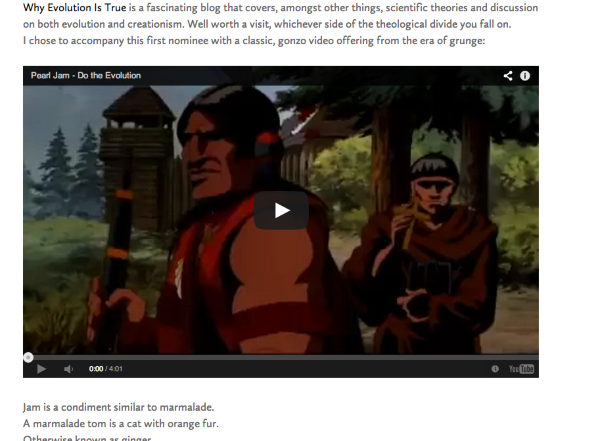
Here’s the exact text I used:
I chose to accompany this first nominee with a classic, gonzo video offering from the era of grunge:


Jam is a condiment similar to marmalade.
A marmalade tom is a cat with orange fur.
Otherwise known as ginger.
Basically, I removed the hyperlink notation around the following text:
<a href="http://youtu.be/aDaOgu2CQtI">Pearl Jam - Do The Evolution</a>Then, I made sure the YouTube link was on its own line.
Could you try adjusting one of your links in your latest post to see if we can get this to work again?
-
-
Ah – so right now, there’s a mobile YouTube URL like this:
http://m.youtube.com/watch?v=aDaOgu2CQtIIf you remove the “m” and just have the following, it should work:
http://youtube.com/watch?v=aDaOgu2CQtICan you give this a try?
-
Aha! Success! Thanks. Has something changed in the way they post the links, I’ve not changed the way I copy and paste them?
-
I don’t believe we’ve changed the way links are posted. However, if you’re grabbing the link from your Android browser, YouTube will automatically give you the mobile link, which isn’t what you want. If you’re adding a YouTube link from your mobile device, you’ll need to pull the “m.” off the link prior to posting.
-
I just realised that, but I only ever use my phone or tablet for blogging – and everything else – and I’ve never had this problem before.
Thanks anyway, I’ve credited your help on the blog post. -
Ah, thanks for that! Definitely not necessary. I’m just glad we were able to get the embeds working again.


- The topic ‘How do I embed video?’ is closed to new replies.
 WordPress.com Forums