How do i enable permanently full-site view on my blogg?
-
I would like to enable permanently full-site view on my blog. Instead of the narrow-screen version when i visit my site on my iPhone or tablet. Can anyone help me with the CSS codes?
The blog I need help with is: (visible only to logged in users)
-
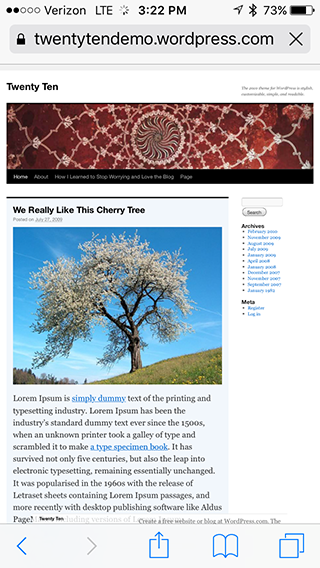
Responsive designed themes such as Twenty Sixteen are difficult to turn back into fixed width themes. The reason that Responsive design has come about is due to the ever-increasing number of people that are surfing the web on smaller devices such as tablets and phones. If we turn your site back into a fixed design and then you view it on a tablet or phone, you will not be able to read anything since it will be very, very small. To read things, you will have to zoom in and scroll around. For an example, here is a screenshot of what I see on my iPhone when viewing the Twenty Ten Demo site, which is a fixed width theme.
The goal of Responsive designs is to keep your content clear, readable and prominent for visitors and not make them zoom and scroll around to see the content. I would suggest taking a quick read through this article on responsive design and why it is important, and becoming more so everyday.
If you wish to proceed, let me know and I’ll see what I can do about turning your site into a fixed width layout.


- The topic ‘How do i enable permanently full-site view on my blogg?’ is closed to new replies.
 WordPress.com Forums