

How do I find other specific WordPress bloggers? Where do I search?
-
Ok, I copied the link and it’s showing up and looks great when I view it from my Reader on WP. But, the only other issue I’m having is when you go to my facebook and click on the photo for the Asian Beef recipe a WP Embarrassing message comes up. However, when I click on the blue link for the recipe it goes to the blog recipe correctly. What am I doing wrong in regard to this? I don’t want to post anything else to fb until I fix this. Thank you greatly! Hopefully this will be my last major issue that I bug you about.
-
For some reason, the two links are different:
vs.
http://modernhenhome.com/2014/03/31/easy-asian-red-pepper-beef-mushrooms/
The former address is correct. Did you by any chance change the post date after you originally posted the blog post?
-
Through my trying to learn various things I may have made this error. How do I change either the WP Asian Beef or the FB Asian Beef to the correct link so they match, please?
-
Oh, and the Pinterest share is still not working when I hover over the More link on my blog. You had said yesterday it was the new custom site’s issue that I just changed over to and that they would get back to me on that.
-
Hi Lisa,
The easiest way to fix the URL problem would be to delete the current post on Facebook and then repost it using the correct link. Here’s a support page from Facebook detailing how to delete Facebook posts:
https://www.facebook.com/help/www/252986458110193
Oh, and the Pinterest share is still not working when I hover over the More link on my blog. You had said yesterday it was the new custom site’s issue that I just changed over to and that they would get back to me on that.
I’m still working on that one! I’ve brought the issue to the attention of the theme developers, and I will let you know as soon as it is resolved.
-
Question: How do I choose the correct photo to show up as the display photo when I share on facebook? This last post is on drawing a pet, but instead of displaying the finished project photo that is the lead-in to the blog story, I am getting a photo from the bottom of the blog that I don’t want displayed. How do I pick which photo will be shared as the main display photo in order to attract viewers?
Also, hoping Pinterest share button will be resolved soon. Thank you!
-
Hi Lisa!
The easiest way to have the correct photo shared when you share your post to Facebook is by setting the Featured Image. Otherwise, Facebook will automatically pull an image from the post. One reason the picture that was shared was because the other photos aren’t very large. The photo that was shared was 1024×764. The other photos are in the 200×300 range.
To make sure the correct image is selected, you’ll want to make sure it’s a bit larger (in the 500×500 range) and set it as a featured image on the post.
You can read a bit more on the images selected with the Publicize feature here:
http://en.support.wordpress.com/publicize/#images-in-publicize
Does that help to answer your question?
-
Ok, that make senses. The only thing I noticed about setting a featured photo in a post is that it then shows up on the post as a very large duplicate photo to the original photo, which looks redundant and odd. Not sure if my readers can see the 2nd large pic or if it’s just me, but when I view in from my Readers its there and strange looking to me. Thanks.
-
Hi Lisa,
The featured image does display across the top of the blog post. Typically, you wouldn’t insert this image into the actual post itself. Instead, you would just set it as the featured image and then, it would appear at the top of the post automatically.
Does that make sense?
-
Good morning! Can you tell me how to import my signature or use a font as my signature to sign my posts, versus just typing my name? Instead of typing, Sincerely, Lisa… I would like to have my name look more custom. Thank you!
-
Hi there!
In order to accomplish that, you will first need to import your signature as an image into your blog. You can do that by either signing a piece of paper and scanning it onto your computer or using a web service that automatically converts your name into script.
Then, you will want to upload your image to your post like a normal image. Just add it to your Media Library by navigating to Dashboard -> Media -> Add New.
Once the image is in your Media Library, you will just need to add it to the bottom of your posts following the instructions here:
http://en.support.wordpress.com/add-media/
Give that a try and let me know if you run into any trouble!
-
-
-
Good morning, I noticed that on my posts there is a permalink for each new post. I would like to share that link on facebook and attach the photo of my choice when I share the link. I don’t care for how FB chooses the photo from my post they want to use. So, I thought if I don’t post straight to fb, but instead share a link and the photo of my choice, then I will have a more attractive post on fb. So… how do I copy the permalink of each post. I tried to hightlight and copy but my ipad isn’t allowing me to grab just the link. Thanks.
-
Hi Lisa!
The easiest way to do this is to use the Facebook sharing buttons at the bottom of your post as shown here:
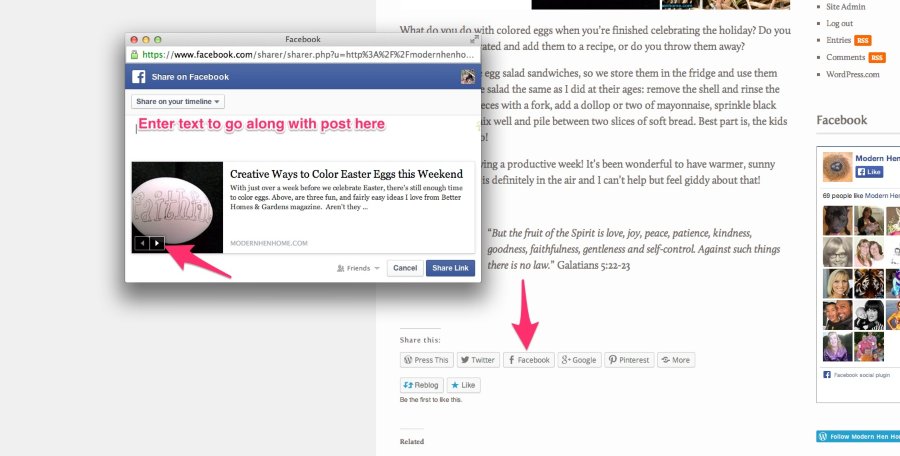
The small arrow on the photo will allow you to cycle through post images so you can select the appropriate one.
Let me know if that’s what you’re looking for!
-
-
-
Good morning! I recently read from another blogger on WP that they use the WP calendar plug-in to help keep them on track. How do I get this calendar? Thank you!
-
Hi Lisa!
It is not possible to install plugins on WordPress.com, for security reasons. Plugins can only be installed on self-hosted WordPress blogs. If you are wondering how WordPress.com differs from WordPress.org, this support article explains the distinction:
However, we do have a Calendar widget explained here:
Would that work for what you’re looking for?
-


- The topic ‘How do I find other specific WordPress bloggers? Where do I search?’ is closed to new replies.


 WordPress.com Forums