

How do I find other specific WordPress bloggers? Where do I search?
-
-
Good afternoon, I am wondering if there is a way to move the pinterest share icon from the bottom of my posts to the top where it will be noticed quicker? Because it’s at the bottom, it’s being missed often. Thank you!
-
Hey Lisa!
Currently, there isn’t a default setting to move your sharing buttons to the top of your posts. However, you may be able to do it through CSS. I would suggest asking in the CSS Customizations forum here:
https://en.forums.wordpress.com/forum/css-customization
We have some CSS gurus in that forum that will be able to let you know for sure!
-
Good afternoon,
I have the Yumblog theme for my blog and I picked it because of the advertised layout. The authors photo is in a circle on the right side and the sharing links for facebook, pinterest, etc. are along the top. I also like how some of the photos seemed to have cropped corners. It’s just a really nice and clean look I had hoped to get when I purchased this theme. Can you tell me what I need to do to get the same benefits as the advertised picture shows? -
Hey Lisa!
Please see my answers to your questions below:
The authors photo is in a circle on the right side
In the demo, the site is using the “About Me” widget explained here:
http://en.support.wordpress.com/widgets/about-me/
If you would like, you could setup an About.Me profile and use that widget. Alternatively, you could use the Gravatar widget shown here:
http://en.support.wordpress.com/widgets/gravatar-profile-widget/
Once you place that widget on your sidebar, your photo should be shown in a circle by default. Can you try setting up the Gravatar widget and let me know if you have any trouble?
The sharing links for facebook, pinterest, etc. are along the top
Details for setting this up can be found on the Support page here:
https://wordpress.com/themes/yumblog/support/
Just follow the instructions under “Adding a Social Menu With Links”
I also like how some of the photos seemed to have cropped corners
Are you referring to the corners on the images shown here?
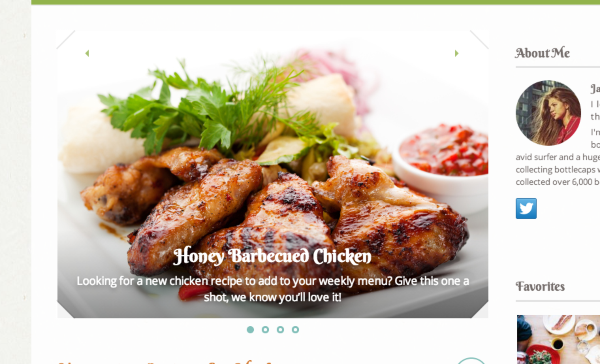
Those are only added to images within the featured slider. Instructions on setting that up can be found here:
https://wordpress.com/themes/yumblog/support/
Just look under the heading “Adding Featured Post Slider to Homepage”.
Let me know if you have any trouble!
-
Is there a way that I can keep my posts from showing the whole post so that readers who receive them via email will have to click on the title and opening paragraph to read the rest of the story? It would be nice to drive traffic to my site this way, versus the follower reading it on their email and never needing to click on the title to go to my website. Also, do I need a minimum of followers and FB followers to begin a business page and begin to receive advertising? Thank you!
-
Hey Lisa!
This is definitely possible from your Reading settings as explained here:
http://en.support.wordpress.com/settings/reading-settings/
Just change “For each article in a feed” to “Summary” from “Full Text”.
Also, do I need a minimum of followers and FB followers to begin a business page and begin to receive advertising?
Are you referring to our advertising platform WordAds? If so, traffic levels are a factor. You can read more about eligibility and the application process here:
If you’re referring to general banner advertising, that is not allowed at WordPress.com outside of the WordAds program. However, we do allow affiliate links. You can read more about our advertising policy here:
http://en.support.wordpress.com/advertising/
Let me know if you have any additional questions!
-
Thank you! I changed the reader settings and will see if it changes the post tomorrow when I send out a new one.
So, in regard to advertising… I have about 800 followers on Facebook for my blog but only a handful that receive posts direct from WordPress. My goal is to keep putting out great posts, build my readership and acquire advertising in hopes of turning the blog into a business. How do I best do this if most of my readers are thru facebook and WP doesn’t allow for ads such as those from googleads and other ad sources? I’ve only been blogging a few months and still trying to learn each step as I reach milestones for my blog. Thank you!
-
Howdy Lisa!
How do I best do this if most of my readers are thru facebook and WP doesn’t allow for ads such as those from googleads and other ad sources?
You have two main options with regards to monetizing your site through advertising:
- You could opt to stay with WordPress.com and apply for the WordAds program. Even if you don’t get accepted into WordAds, you could still use affiliate links on your blog (product links in blog posts). In that case, you would get paid if readers clicked through those links and purchase products.
- You could look to move to a self-hosted site using WordPress.org software. For more on the difference between WordPress.com and WordPress.org, check here:
This would undoubtedly expand the advertising options enabling you to use things like Google AdSense to help monetize your site.
The decision really is up to you! Moving to a .org site would definitely offer up more freedom, but it comes with more responsibility (you’re in charge of plugins, hosting, etc).
Does that help to explain your options?
-
Ok, when I started my blog it was with a wordpress email address and then I changed over to a .com address thinking this would be best for running a business as most businesses have a .com. So… I guess I will have to think on this. Not sure what to do and so new that I don’t want to lose assistance like this for helping me navigate my questions. Thank you.
-
Hi Lisa!
You’re correct – when you started, you began with a domain.wordpress.com address. Moving to modernhenhome.com involved purchasing the domain upgrade through WordPress.com. However, that also means you’re the owner of modernhenhome.com so you could use it off of WordPress.com if you want. For example, you could setup hosting elsewhere (like Bluehost.com or GoDaddy.com). That would allow you to setup a self-hosted site.
It’s something to consider in the future as your site continues to grow. Moving to a self-hosted site gives you virtually unlimited freedom over how your site looks. However, as you mention, it comes with some difficulties like not having dedicated support from WordPress.com staffers. Just something to consider!
If you have any questions regarding what the switch would entail or the differences between WordPress.com and WordPress.org, please let me know!
-
Thank you for helping to better understand. I will revisit this when I feel ready for advertising. Thank you.
-
Can you tell me how to figure out what my google link is so that I can add in within my Social Media Menu under settings? I know my link for FB and Pinterest but can’t find what I need to set it to the top of my page since I don’t know my link. Very confusing. Thank you!
-
-
Glad you were able to figure this out Lisa! Let me know if you have any additional questions.
-
Hi Jeremy, I have to get a new email address and change everything, including my blog to the new one. Does wp offer email addresses and do you find it best to use a blog name in an email address? I plan to use the email for both my blog business and personal use. Thank you!
-
Hey Lisa!
You have two options regarding creating a custom email address for your domain.
- You can setup email forwarding following the instructions here:
http://en.support.wordpress.com/email-forwarding/
In this scenario, email to your custom address ((email visible only to moderators and staff) for example) would be forwarded to an address you already own (like a Gmail address for instance).
- You can add a custom email address through a third-party as explained here:
http://en.support.wordpress.com/domains/add-email/
In this scenario, you would be setting up a separate address with a separate inbox
Does that help to explain the options?
- You can setup email forwarding following the instructions here:
-
Hi Jeremy,
Can you tell me if there is a way to add a Pinterest button to every photo and post on my blog? I would like readers to hover over photo or below photo and see Pinterest button so they can pin the post right away if interested. Thank you! -
Hi Lisa!
Currently, there isn’t a way to do that at WordPress.com. I’m sorry! The only method for adding a Pinterest button would be through adding it to the bottom of posts using your Sharing settings:
Let me know if you need anything else.
-
Ok, thank you! Another question though. When I look at my blog page I don’t a place for new readers to subscribe and receive posts to their email inbox. Can you tell me where this is at on my page and why I can’t view it even though I have a widget set up. Hopefully, it’s the right widget since I don’t see one called Subscribe, just a Follow widget. Not sure if they mean the same thing? Thanks


- The topic ‘How do I find other specific WordPress bloggers? Where do I search?’ is closed to new replies.


 WordPress.com Forums