

How do I find other specific WordPress bloggers? Where do I search?
-
Hey Lisa,
When you reblog a post, it posts the content to the top of your own blog like a new blog post along with your commentary. You can see an example of a reblog here along with the sections broken down:
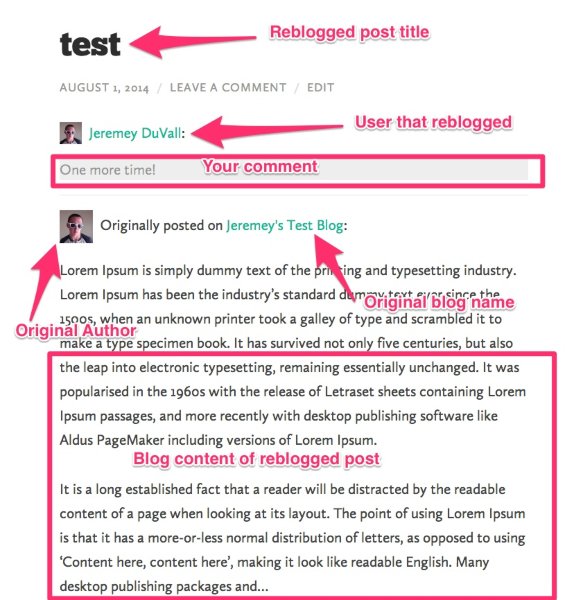
It’s meant for times when you want to share other blog posts that you find elsewhere on your own blog with a bit of commentary yet still give recognition to the original writer. You can read a bit more here:
It looks like you reblogged the post you mention on your other blog here:
Did you mean to reshare this blog post on the original blog (modernhenhome.com)?
Complete tangent: That looks delicious! :)
-
Hey Lisa,
Remember awhile back when we had some issues with share buttons hidden behind the “More” button? That should be fixed now. Just wanted to let you know!
For reference, the place in the thread I’m referring to is here:
-
Great! Thank you Jeremy. Sorry it’s taken so long to get back to you from your last answer.
I am still going back and forth on switching the blog to .org so that I can start to take on advertising, but when I read the link you gave me about transferring over, I thought it stated I would not be able to keep my current page format, which is Yumblog. Can you tell me more about this and if this means I have to get a whole new look for the blog, is it time confusing, etc? Thanks.
-
Hey Lisa,
In some cases, it isn’t possible to keep the same theme when you move to a self-hosted site. This is because some themes (not many but some) are exclusive to WordPress.com. However, the Yumblog theme is available for self-hosted sites:
Unfortunately, you would need to repurchase the theme for your self-hosted site. Your purchase at WordPress.com for that theme is completely separate.
Since the same theme is available for self-hosted sites, this shouldn’t be that time consuming. I’d reckon we could get you up and running in a matter of hours!
-
Hi Jeremy, Hope you are well! Just wondering if there’s a widget or something that I can have pop up a statement to ask new readers if they would like to receive my blog through their email? I notice on some blogs it’s made prominent at the top or a square screen pops up and offers a free booklet with great tips for signing up to the blog with their email. I’m looking to capture more of my visitors from Pinterest to subscribe. Thank you! I also have a friend that offers a free tips sheet for living if readers subscribe to hers. Would like to know how to do this.
-
Hey Lisa!
The majority of those forms are generated through plugins, which aren’t allowed at WordPress.com. There isn’t a method at WordPress.com that would allow you to install a pop-up banner or an overlay that comes up on the screen. The main method would just be to use the Follow Blog widget, which you’re already using. Sorry I couldn’t be of more help!
-
Hi Jeremy,
I changed the reader to show photo and blog copy when posting and readers open to see it in their email. However, is it possible to have it show the first photo and only a portion of the blog so that they have to click on the title to see more copy and photos? I noticed that Emily Clark does this on her WP site. I also think it’s a way to lure readers to click on the blog post and see the whole site instead of reading it all from their email. What do you think? -
https://mail.google.com/mail/?tab=wm#inbox/14818ab43d07172e
Here is the link to see the recent post from Emily Clark who is on WP also. Reader has to click on the title to read the rest of the story yet can see a photo or two first. Thanks. -
Hey Lisa!
Unfortunately, that link to your email inbox won’t work (I would need to be signed into your account). I believe the More tag will set this up for you:
http://en.support.wordpress.com/splitting-content/more-tag/
Just insert that where you would like the email to be cut-off. It should look something like this:
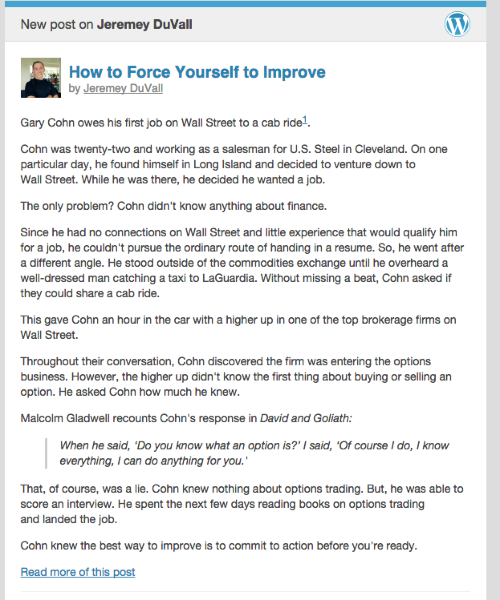
My post above doesn’t have any photos in it, but the photos would be included if they’re included above the More tag within the actual post.
Give that a try and let me know if that achieves what you’re looking for!
-
Hey Jeremy,
I’ve made an error and deleted my About Me widget. It’s not even in my choices of widgets any longer. Can you help me recover this so I can place my author photo and short bio back on my main page?Also, Is it possible to add a Pinterest button so that readers can hover over a photo or story and then pin the post? Or can I add a widget in the sidebar with a Pinterest logo and URL code? Thank you, Lisa
-
Hi Lisa,
Regarding the About Me widget, unfortunately, once it’s deleted, I’m unable to recover it. The best thing to do would be to re-add it using the instructions here:
http://en.support.wordpress.com/widgets/about-me/
Also, Is it possible to add a Pinterest button so that readers can hover over a photo or story and then pin the post?
Are you referring to a “Pin It” button that appears when you hover over specific images? If so, that isn’t possible. However, readers still have the option of using the Pinterest button at the bottom of your posts (alongside the other sharing icons).
Or can I add a widget in the sidebar with a Pinterest logo and URL code?
You could add a Pinterest button to your sidebar following the instructions here:
http://en.support.wordpress.com/widgets/create-your-own-widget/
However, that wouldn’t create a link specific to that post (it would just link people to your Pinterest profile) so I’m not sure that achieves what you’re looking for.
One last note, for future support requests (don’t worry about it for replies to the questions above), can you open a new forum thread? We generally try to keep the forum thread topic related to the content so other bloggers can easily find the information if they’re searching. Long threads like this one can be a bit difficult to sift through!
-
Great and thank you! I didn’t start a new thread because I thought I might lose you as my support, but will do! Thanks.
-
I can’t promise I’ll be the one to answer future support requests, but I can promise that every Happiness Engineer here is superb!


- The topic ‘How do I find other specific WordPress bloggers? Where do I search?’ is closed to new replies.


 WordPress.com Forums