

How do I fix Home page Featured Image and Title Problems?
-
I use the “Structure Theme,” and continually have problems with the current post’s featured image and title being visible on the “home page.” A picture from a prior post and a title from a much older post are fixed and they won’t go away. The size of my featured image is correct. (640 x 380). My previous post had the featured image embedded in the article and the featured image block on the draft side and it still would not load to the home page. Today I did not embed the featured image in my post, however, I did insert it in the featured image block before publishing. That doesn’t work either. Short of ditching this theme, I don’t know what else to do. (Note: I have cleared cache, cookies, history, etc.) I am using Internet Explorer 11 as my browser.
The blog I need help with is: (visible only to logged in users)
-
I’ll tag this thread for a Themes Staff follow-up. Please subscribe to the thread so you are notified when they respond and please be patient while waiting.
-
If you’d like the featured post on the homepage to be pulled from any category, you can deselect “Christianity” as the featured category under Customize > Theme Options, and select “None: use the most recent post” instead:
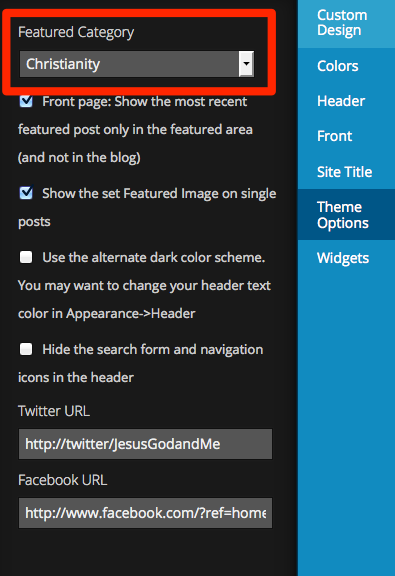
-
Kathryn:
You have solved my problem — kudos to you!
And a thank you to “timethief” for passing it forward.God Bless You both.
-


- The topic ‘How do I fix Home page Featured Image and Title Problems?’ is closed to new replies.
 WordPress.com Forums