

How do I get a home page for my blog?
-
I think I may have screwed up. I just started my blog, but I don’t seem to have a home page. How do I get a home page?
The blog I need help with is: (visible only to logged in users)
-
Hi there!
Do you want to create a static Home Page and a separate page for all your Posts? You can do this by going to Pages > Add New and create your static Home Page. Once that’s created create a new page the same way and title it Blog or Posts (or whichever you want to title your Posts Page). This page should be empty.
Then go to Settings > Reading in your Dashboard. At the top where it says Front Page displays, select Static and the select your newly created Home Page as the Front Page, and your Blog/Posts page as your Posts page as seen here:
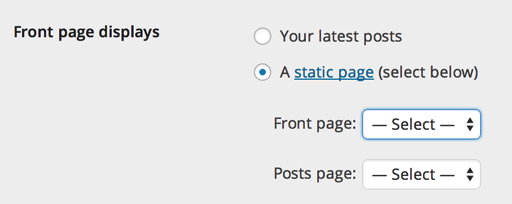
Let me know if you have any questions with this!


- The topic ‘How do I get a home page for my blog?’ is closed to new replies.
 WordPress.com Forums