

How do I get a link to show up on the menu in the same location as my added page
-
I am using a customized version of the Bushwick theme. I am trying to get all menu items to show up on the right side of the screen. When I add a page, it appears correctly. However, when I add a link it shows up on the left side of the page over the image. How do I get a link to show up on the menu in the same location as my added pages?
The blog I need help with is: (visible only to logged in users)
-
Thanks Jeremey. I did set them up under the same menu. They show up together on the mobile site but on a computer screen the link is stranded on the far left of the screen, buried in an image. I am wondering if it is something to do with the theme that I am using.
-
Hi James,
I apologize for not seeing this earlier! The color blended into your header background.
So, you’re correct – this is a feature of the theme. Since the “Blog” menu item is specified with your home page URL, it’s treated like the “Home” menu icon on the demo shown here:
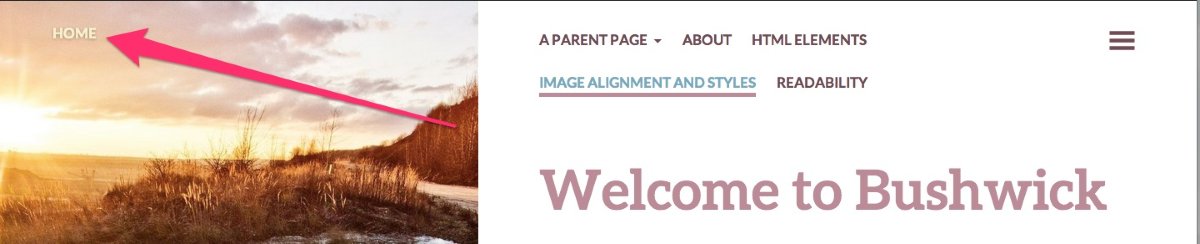
I see you’ve already started working on creating a page named “Blog”. The easiest way around this issue would be to use the page you created rather than linking the “Blog” menu item to your home page. You could still use the submenus you currently have in place. The actual Blog item would just link to your newly created page. Does that make sense?
Currently, that page is blank. I assume you would still like everyone to see your blog posts when they click that page. In order to do that, could you try using the Display Posts Shortcode explained here?
Using that code, you can list your blog posts out so that readers can look at all of your posts from the “Blog” menu item or they can use the categories you’ve specified as a submenu.
Let me know if you have any additional questions!


- The topic ‘How do I get a link to show up on the menu in the same location as my added page’ is closed to new replies.
 WordPress.com Forums