

How do I get a widget from my About page (how did it get there?) onto my Home p
-
Hi, I’m trying to add a widget to my blog, A Life in Poems, so that people can subscribe and get emails notifying them of my posts. At first i thought it wasn’t showing up at all, but then i found it on my About page! How do I get it onto my Home page?
Thanks,
Willow
The blog I need help with is: (visible only to logged in users)
-
-
Oops, I was wrong.It shows up on the pages of individual posts but not on my Home page. Also removed everything from two Inactive Sidebars on the Widget page, no results. Help! Thanks,
Willow
-
Hi there,
Currently, you have the Follow Blog widget set to only appear if you’re the author of the particular page/post as shown here:
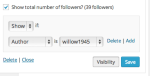
This rule excludes the widget from the home page. To get the Follow Blog widget to appear on your home page, you’ll need to remove that rule. To do that, navigate to your Widgets page here:
https://alifeinpoems.wordpress.com/wp-admin/widgets.php
Expand the Follow Blog widget and click “Visibility”. Click the “Delete” link to the right of the rule (not the bottom of the widget).
That should do the trick! Please let me know if you need anything else.
-
-


- The topic ‘How do I get a widget from my About page (how did it get there?) onto my Home p’ is closed to new replies.
 WordPress.com Forums