

How do I get started with my premium website designing my web pages?
-
I can’t figure out how to design static pages. It’s taken me hours and the instructions are completely baffling!
The blog I need help with is: (visible only to logged in users)
-
Hi there,
I’m not quite sure what you mean. Static pages are pretty much free to add text, images, media, etc to your desire. Can you tell me exactly what you are looking for? I’d be happy to see what I can do!
-
I assumed that I could design a static page so that I could build a website. It was fairly straightforward using Go-Daddy. However, there seems to be a helluva job navigating things like using a template, uploading images to customize a template, etc. Can’t even get to load a template I can change by putting my own images on.
-
You can apply themes that you like from:
You can click Activate on the top right corner of any theme’s support page. Here’s an example:
https://theme.wordpress.com/themes/sela/
Many times customizing a site depends on the theme.
I see that you chose Sela. Have you looked that that support guide? It will teach you how to set up your site like the demo.
As for uploading images, you can do that on any page by clicking Add Media as seen here:
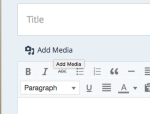
If you have any other questions, let me know!
-
Thanks, I’ll try it tomorrow. I’m afraid I was at it for several hours and I’m exhausted. Thanks again for your help.
-


- The topic ‘How do I get started with my premium website designing my web pages?’ is closed to new replies.


 WordPress.com Forums