

How do I get the "all pages" option under "Settings/reading" to see all my pages
-
I set up a rough site a couple of years ago, put up a “hello, World” post (setting the page as “home”) and left it till a month or so ago when I upgraded to the $99 level. Now I am starting to set up a real home page with the intent of switching my original home page to the blog page. So I follow the “get a home page” instructions and set up a dummy page, calling it “new home” so not to conflict with the original page. Now, when I select the all “all pages” option under “settings/reading”, I see my profile page and the dummy “new home” page, but not my old placeholder page. But when I give my browser the URL I set up at the time of the $99 upgrade (PaulaSJordanblog.com) I go to the old original page with my Hello World post. Same thing with the PaulaSJordan.wordpress.com URL. What should I do? Thank you.
The blog I need help with is: (visible only to logged in users)
-
HI Paula!
First I’ll try to explain what’s happening, and then we can work together to make sure your site is setup how you’d like it.
If you look at your Settings > Reading page, you have the top setting as “Front page displays your latest posts.”
With that setting in place, WordPress will put all of your Posts content on the “Home” tab in your navigation menu, under your domain name’s top address. It’s not part of your Pages content at all, that’s why it’s address is just paulasjordanblog.com — not paulasjordanblog.com/pagetitle. And that’s why it’s not listed in your “All Pages” menu in the dashboard.
Now, you also have an old page created in 2011 in the Trash of your Pages content. If you’re looking for the old page that you’re not finding, that might be the page. Read here on how to restore content from the trash:
Hopefully that makes sense why you can see the 3 pages in your “All Pages” screen, but four tabs on your site.
Now, if you’d like your front page to be your static “New Home” page, and your blog posts to appear on another tab, you’ll need to adjust that first setting from “your latest posts” to “a static front page.” I think this setup is what you’re looking for:
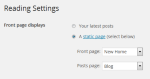
Let me know if that change helps your site appear correctly, or if you have more questions.
Best,
-Alex G.
Happiness Engineer | WordPress.com
-
Hi, Alex.
Thanks for your help.
I did find the settings/reading page and made the change you indicated, reset it to new home, saved it. logged out, closed the tab on my browser, opened a new tab, accessed the blog using paulasjordanblog.com and arrived at the original “home” page as if nothing had happened. This page has a single post with a picture of me at Stonehenge.
The “new home” page has no post at all.
Interestingly, the menu shows “home” on the left and “new home” all the way over on the right, as if the change I just made selecting new home as the front page had never happened.
I am wondering if somehow, because of the delay between my first post a year ago with the addition of the upgrade and then new work, I may actually have two wordshop blogs going?
Also, when I began work on completing the site just a few days ago I edited that first post, saved it, and deleted the original from my list of posts. So that oldest one is what is in the trash and the one I am seeing — with the Stonehenge picture, is the one that’s still coming up as first page, but does not show up in “all pages.”
So, more help needed, I’m afraid.
Thanks.
-
Hi Paula,
Just checked out your dashboard and your “Settings > Reading” were still set to display your latest posts on the home page. I made the adjustments and clicked “Saved Changes” at the bottom of the page. — I now see the update on your site.
Could you visit your site and see if this change was what you wanted?
Best,
-Alex G.
Happiness Engineer | WordPress.com
-
Hi, Alex. Yes, that is exactly what I wanted. Thank you!
“Happiness engineers” I love it!
Paula
~~~~~~~~~~~~~~~~~~~~ -
Glad that’s what you needed! :)
The “save changes” probably didn’t go all the way through before you logged out or something silly like that.
Let me know if you have any more questions while customizing!
-Alex G.


- The topic ‘How do I get the "all pages" option under "Settings/reading" to see all my pages’ is closed to new replies.
 WordPress.com Forums