

How do I get the selected image/thumbnail to appear in my tweets?
-
I’m trying to get my tweets to show the selected image for each post, but I can’t get it to work. Whenever I tweet a shortlink all I get is the link, no image, no description, nothing. Any clues as to what I could do about it? I’ve found that posts without pictures attract far less attention.
The blog I need help with is: (visible only to logged in users)
-
Hi Joaquín,
I believe you’re referring to Twitter cards, which display your tweets in the best format for your particular content. You can read an overview of them here:
https://dev.twitter.com/cards/overview
In order for your tweets to appear with Twitter cards, you will need to run a post URL through the validator here:
https://cards-dev.twitter.com/validator
Just enter the URL of any post on your site. Then, you’ll see a link for “Request Approval”. Follow the steps there, and you should be good to go!
-
Hi Jeremy, thank you for your help.
I tried running the link through the validator, but I didn’t get any “Request Approval” link. All I got was a preview of the card and a small text with a green background stating “wp.me whitelist request was approved 18 days ago”.
I tried tweeting the link afterwards, but still got the same result, no thumbnail, no summary.
Any ideas as to what I should do?
Take Care
-
Hi!
Can you try running the following URL through the validator?
http://observatoriojfk.com/2014/10/06/el-presupuesto-federal/
You should see this (Note the blue “Request Approval” button):
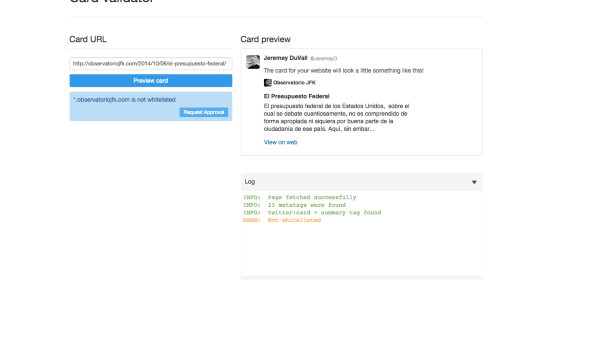
Let me know if that doesn’t come up for you!
-
Hey Jeremy, no, I keep trying to get the thumbnail and summary to no avail. No blue “Request Approval” button appears, even after changing browsers.
What should I do?
-
Hi!
Can you complete the following steps and take a screenshot of what you’re seeing on your side at the end?
- Navigate to the following page:
- Under the text box for “Card URL”, enter the following address:
http://observatoriojfk.com/2014/10/06/el-presupuesto-federal/ - Hit “Preview Card”
Then, can you take a screenshot of the entire screen and upload it to your Media Library? Instructions for taking a screenshot can be found here:


- The topic ‘How do I get the selected image/thumbnail to appear in my tweets?’ is closed to new replies.
 WordPress.com Forums