

How do I get the stat/comments bar at the top of my blog when I'm signed in?
-
Hi, Not sure even how to ask this. But when I sign into my blog, and then view my blog, I find it hard to get the bar on the top that shows if I have comments, or the stats widget. It’s like I’m looking at the blog not signed in, and I don’t have the option to edit it. If I go to another word press blog, then i get the bar again. Then, when I go back to my blog, I lose it again. I have yet to figure how to get to my blog with the bar/edit options… Can you help>
The blog I need help with is: (visible only to logged in users)
-
Hi Timothy,
It sounds like you’re referring to the admin bar disappearing on your page, but not other WordPress pages.
Everything is looking setup properly on your site, so I believe the issue is that your browser has third-party cookies disabled.
Would you please visit this support page?
If third-party cookies are properly setup you’ll see this:
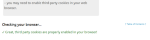
WordPress.com uses those third-party cookies to make sure you stay logged in as a WordPress user across sites with mapped custom domains. If yours are disabled, since your site has mapped custom domain the site essentially loads as if you were logged out.
That support page will also guide you how to enable third-party cookies for WordPress.com, and that should clear it up. :)
Let me know if you hit any snags!
Best,
-Alex G.
Happiness Engineer | WordPress.com


- The topic ‘How do I get the stat/comments bar at the top of my blog when I'm signed in?’ is closed to new replies.
 WordPress.com Forums