

how do I import pictures from my computer
-
I have read your pages now for almost a week now and I still cannot figure out how to bring over my pictures fo ruse in blog or website
The blog I need help with is: (visible only to logged in users)
-
Hi there,
When you are editing a post you will see a button that says Add Media as seen here:
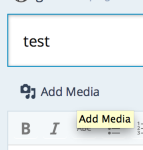
Click on that and then change the tab to Upload Media at the top as seen here:

Then you can select files for upload on your computer.
Let me know if you have any questions with this!
-
Thanks I uploaded the frame but not the image of the picture so I still cannot put picture in the post I can upload the media but not as the image still no help what am I doing wrong
-
Does the image have to be a photo or can it be cut and paste from a word document? This is becoming much to difficult…
-
It must be an image file – meaning that the file has to end in .png or .jpeg. You can find more information about this here:
Does the image have to be a photo or can it be cut and paste from a word document?
It cannot be cut/pasted from a Word Document. It must be an image file in your computer.


- The topic ‘how do I import pictures from my computer’ is closed to new replies.
 WordPress.com Forums