

How do I increase the width of content on Silvio theme using CSS
-
How do I increase the width of content on Silvio theme using CSS
The blog I need help with is: (visible only to logged in users)
-
Hello @drsreekarh,
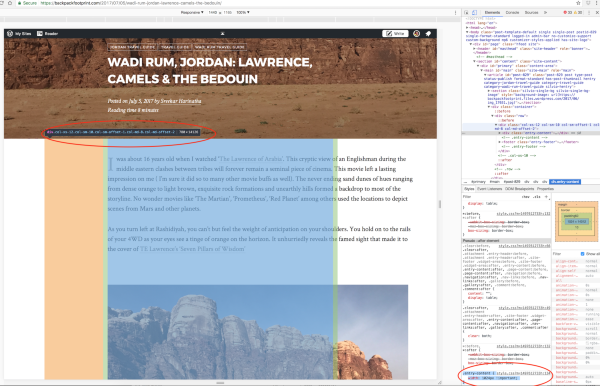
While you could do this (below) there is an offset added by a div with no class to modify it to the left.
.entry-content {
    width: 1024px !important;
}
You might want to post this in the Silvio Forum > https://premium-themes.forums.wordpress.com/forum/silvio
The author might be able to give a more elegant solution than this!
-
-
@solybarr’s solution is good! It’s a very simple workaround.
If you would like to get your content closer to full width you can actually manipulate those div’s that @solybarr was talking about but it’s a fairly complex process. The code I used is below. Basically what I did was nullify the effects of the column classes and adjust the padding/margins in the container and row classes so that I can shift the contents of the entire page using left padding percentage in the all columns entry.
.container { padding: 0 0 0 0; margin: 0 0 0 0; width: 100%; } .row { margin: 0 0 0 0; } .col-xs-1, .col-sm-1, .col-md-1, .col-lg-1, .col-xs-2, .col-sm-2, .col-md-2, .col-lg-2, .col-xs-3, .col-sm-3, .col-md-3, .col-lg-3, .col-xs-4, .col-sm-4, .col-md-4, .col-lg-4, .col-xs-5, .col-sm-5, .col-md-5, .col-lg-5, .col-xs-6, .col-sm-6, .col-md-6, .col-lg-6, .col-xs-7, .col-sm-7, .col-md-7, .col-lg-7, .col-xs-8, .col-sm-8, .col-md-8, .col-lg-8, .col-xs-9, .col-sm-9, .col-md-9, .col-lg-9, .col-xs-10, .col-sm-10, .col-md-10, .col-lg-10, .col-xs-11, .col-sm-11, .col-md-11, .col-lg-11, .col-xs-12, .col-sm-12, .col-md-12, .col-lg-12 { position: relative; min-height: 1px; padding: 0 0 0 2%; /* This now shifts all content */ } .col-xs-1, .col-xs-2, .col-xs-3, .col-xs-4, .col-xs-5, .col-xs-6, .col-xs-7, .col-xs-8, .col-xs-9, .col-xs-10, .col-xs-11, .col-xs-12 { float: left; } .col-xs-12 { width: 100%; } .col-xs-11 { width: 100%; } .col-xs-10 { width: 100%; } .col-xs-9 { width: 100%; } .col-xs-8 { width: 100%; } .col-xs-7 { width: 100%; } .col-xs-6 { width: 100%; } .col-xs-5 { width: 100%; } .col-xs-4 { width: 100%; } .col-xs-3 { width: 100%; } .col-xs-2 { width: 100%; } .col-xs-1 { width: 100%; } .col-xs-pull-12 { right: 0; } .col-xs-pull-11 { right: 0; } .col-xs-pull-10 { right: 0; } .col-xs-pull-9 { right: 0; } .col-xs-pull-8 { right: 0; } .col-xs-pull-7 { right: 0; } .col-xs-pull-6 { right: 0; } .col-xs-pull-5 { right: 0; } .col-xs-pull-4 { right: 0; } .col-xs-pull-3 { right: 0; } .col-xs-pull-2 { right: 0; } .col-xs-pull-1 { right: 0; } .col-xs-pull-0 { right: 0; } .col-xs-push-12 { left: 0; } .col-xs-push-11 { left: 0; } .col-xs-push-10 { left: 0; } .col-xs-push-9 { left: 0; } .col-xs-push-8 { left: 0; } .col-xs-push-7 { left: 0; } .col-xs-push-6 { left: 0; } .col-xs-push-5 { left: 0; } .col-xs-push-4 { left: 0; } .col-xs-push-3 { left: 0; } .col-xs-push-2 { left: 0; } .col-xs-push-1 { left: 0; } .col-xs-push-0 { left: 0; } .col-xs-offset-12 { margin-left: 0; } .col-xs-offset-11 { margin-left: 0; } .col-xs-offset-10 { margin-left: 0; } .col-xs-offset-9 { margin-left: 0; } .col-xs-offset-8 { margin-left: 0; } .col-xs-offset-7 { margin-left: 0; } .col-xs-offset-6 { margin-left: 0; } .col-xs-offset-5 { margin-left: 0; } .col-xs-offset-4 { margin-left: 0; } .col-xs-offset-3 { margin-left: 0; } .col-xs-offset-2 { margin-left: 0; } .col-xs-offset-1 { margin-left: 0; } .col-xs-offset-0 { margin-left: 0; } @media (min-width: 768px) { .col-sm-1, .col-sm-2, .col-sm-3, .col-sm-4, .col-sm-5, .col-sm-6, .col-sm-7, .col-sm-8, .col-sm-9, .col-sm-10, .col-sm-11, .col-sm-12 { float: left; } .col-sm-12 { width: 100%; } .col-sm-11 { width: 100%; } .col-sm-10 { width: 100%; } .col-sm-9 { width: 100%; } .col-sm-8 { width: 100%; } .col-sm-7 { width: 100%; } .col-sm-6 { width: 100%; } .col-sm-5 { width: 100%; } .col-sm-4 { width: 100%; } .col-sm-3 { width: 100%; } .col-sm-2 { width: 100%; } .col-sm-1 { width: 100%; } .col-sm-pull-12 { right: 0; } .col-sm-pull-11 { right: 0; } .col-sm-pull-10 { right: 0; } .col-sm-pull-9 { right: 0; } .col-sm-pull-8 { right: 0; } .col-sm-pull-7 { right: 0; } .col-sm-pull-6 { right: 0; } .col-sm-pull-5 { right: 0; } .col-sm-pull-4 { right: 0; } .col-sm-pull-3 { right: 0; } .col-sm-pull-2 { right: 0; } .col-sm-pull-1 { right: 0; } .col-sm-pull-0 { right: 0; } .col-sm-push-12 { left: 0; } .col-sm-push-11 { left: 0; } .col-sm-push-10 { left: 0; } .col-sm-push-9 { left: 0; } .col-sm-push-8 { left: 0; } .col-sm-push-7 { left: 0; } .col-sm-push-6 { left: 0; } .col-sm-push-5 { left: 0; } .col-sm-push-4 { left: 0; } .col-sm-push-3 { left: 0; } .col-sm-push-2 { left: 0; } .col-sm-push-1 { left: 0; } .col-sm-push-0 { left: 0; } .col-sm-offset-12 { margin-left: 0; } .col-sm-offset-11 { margin-left: 0; } .col-sm-offset-10 { margin-left: 0; } .col-sm-offset-9 { margin-left: 0; } .col-sm-offset-8 { margin-left: 0; } .col-sm-offset-7 { margin-left: 0; } .col-sm-offset-6 { margin-left: 0; } .col-sm-offset-5 { margin-left: 0; } .col-sm-offset-4 { margin-left: 0; } .col-sm-offset-3 { margin-left: 0; } .col-sm-offset-2 { margin-left: 0; } .col-sm-offset-1 { margin-left: 0; } .col-sm-offset-0 { margin-left: 0; } } @media (min-width: 992px) { .col-md-1, .col-md-2, .col-md-3, .col-md-4, .col-md-5, .col-md-6, .col-md-7, .col-md-8, .col-md-9, .col-md-10, .col-md-11, .col-md-12 { float: left; } .col-md-12 { width: 100%; } .col-md-11 { width: 100%; } .col-md-10 { width: 100%; } .col-md-9 { width: 100%; } .col-md-8 { width: 100%; } .col-md-7 { width: 100%; } .col-md-6 { width: 100%; } .col-md-5 { width: 100%; } .col-md-4 { width: 100%; } .col-md-3 { width: 100%; } .col-md-2 { width: 100%; } .col-md-1 { width: 100%; } .col-md-pull-12 { right: 0; } .col-md-pull-11 { right: 0; } .col-md-pull-10 { right: 0; } .col-md-pull-9 { right: 0; } .col-md-pull-8 { right: 0; } .col-md-pull-7 { right: 0; } .col-md-pull-6 { right: 0; } .col-md-pull-5 { right: 0; } .col-md-pull-4 { right: 0; } .col-md-pull-3 { right: 0; } .col-md-pull-2 { right: 0; } .col-md-pull-1 { right: 0; } .col-md-pull-0 { right: 0; } .col-md-push-12 { left: 0; } .col-md-push-11 { left: 0; } .col-md-push-10 { left: 0; } .col-md-push-9 { left: 0; } .col-md-push-8 { left: 0; } .col-md-push-7 { left: 0; } .col-md-push-6 { left: 0; } .col-md-push-5 { left: 0; } .col-md-push-4 { left: 0; } .col-md-push-3 { left: 0; } .col-md-push-2 { left: 0; } .col-md-push-1 { left: 0; } .col-md-push-0 { left: 0; } .col-md-offset-12 { margin-left: 0; } .col-md-offset-11 { margin-left: 0; } .col-md-offset-10 { margin-left: 0; } .col-md-offset-9 { margin-left: 0; } .col-md-offset-8 { margin-left: 0; } .col-md-offset-7 { margin-left: 0; } .col-md-offset-6 { margin-left: 0; } .col-md-offset-5 { margin-left: 0; } .col-md-offset-4 { margin-left: 0; } .col-md-offset-3 { margin-left: 0; } .col-md-offset-2 { margin-left: 0; } .col-md-offset-1 { margin-left: 0; } .col-md-offset-0 { margin-left: 0; } } @media (min-width: 1200px) { .col-lg-1, .col-lg-2, .col-lg-3, .col-lg-4, .col-lg-5, .col-lg-6, .col-lg-7, .col-lg-8, .col-lg-9, .col-lg-10, .col-lg-11, .col-lg-12 { float: left; } .col-lg-12 { width: 100%; } .col-lg-11 { width: 100%; } .col-lg-10 { width: 100%; } .col-lg-9 { width: 100%; } .col-lg-8 { width: 100%; } .col-lg-7 { width: 100%; } .col-lg-6 { width: 100%; } .col-lg-5 { width: 100%; } .col-lg-4 { width: 100%; } .col-lg-3 { width: 100%; } .col-lg-2 { width: 100%; } .col-lg-1 { width: 100%; } .col-lg-pull-12 { right: 0; } .col-lg-pull-11 { right: 0; } .col-lg-pull-10 { right: 0; } .col-lg-pull-9 { right: 0; } .col-lg-pull-8 { right: 0; } .col-lg-pull-7 { right: 0; } .col-lg-pull-6 { right: 0; } .col-lg-pull-5 { right: 0; } .col-lg-pull-4 { right: 0; } .col-lg-pull-3 { right: 0; } .col-lg-pull-2 { right: 0; } .col-lg-pull-1 { right: 0; } .col-lg-pull-0 { right: 0; } .col-lg-push-12 { left: 0; } .col-lg-push-11 { left: 0; } .col-lg-push-10 { left: 0; } .col-lg-push-9 { left: 0; } .col-lg-push-8 { left: 0; } .col-lg-push-7 { left: 0; } .col-lg-push-6 { left: 0; } .col-lg-push-5 { left: 0; } .col-lg-push-4 { left: 0; } .col-lg-push-3 { left: 0; } .col-lg-push-2 { left: 0; } .col-lg-push-1 { left: 0; } .col-lg-push-0 { left: 0; } .col-lg-offset-12 { margin-left: 0; } .col-lg-offset-11 { margin-left: 0; } .col-lg-offset-10 { margin-left: 0; } .col-lg-offset-9 { margin-left: 0; } .col-lg-offset-8 { margin-left: 0; } .col-lg-offset-7 { margin-left: 0; } .col-lg-offset-6 { margin-left: 0; } .col-lg-offset-5 { margin-left: 0; } .col-lg-offset-4 { margin-left: 0; } .col-lg-offset-3 { margin-left: 0; } .col-lg-offset-2 { margin-left: 0; } .col-lg-offset-1 { margin-left: 0; } .col-lg-offset-0 { margin-left: 0; } } -
Thanks so much @lastfarthing,
It is indeed complex! The reason I didn’t mention that is it might affect the rest of the site and then madness ensues.
@drsreekarh if you go ahead and make changes to the “cols” take a minute to navigate through the site and see if other things have shifted, then keep making changes. That way you have some control of what’s going on.
Best regards!
-
madness ensues
Isn’t that the truth?
One more change @drsreekarh. Since you’re using a blog based layout instead of a pages based layout, you’ll want to remove the min-height: 1px; from your all columns section to make your blog format correctly. I don’t know why that works and the world may never know but that section would look like this:
.col-xs-1, .col-sm-1, .col-md-1, .col-lg-1, .col-xs-2, .col-sm-2, .col-md-2, .col-lg-2, .col-xs-3, .col-sm-3, .col-md-3, .col-lg-3, .col-xs-4, .col-sm-4, .col-md-4, .col-lg-4, .col-xs-5, .col-sm-5, .col-md-5, .col-lg-5, .col-xs-6, .col-sm-6, .col-md-6, .col-lg-6, .col-xs-7, .col-sm-7, .col-md-7, .col-lg-7, .col-xs-8, .col-sm-8, .col-md-8, .col-lg-8, .col-xs-9, .col-sm-9, .col-md-9, .col-lg-9, .col-xs-10, .col-sm-10, .col-md-10, .col-lg-10, .col-xs-11, .col-sm-11, .col-md-11, .col-lg-11, .col-xs-12, .col-sm-12, .col-md-12, .col-lg-12 { position: relative; padding: 0 0 0 2%; /* This now shifts all content */ } -
Tried this
.single .hentry > .container {
width: 100% !important;
}
.single .hentry > .container > .row > .col-xs-12 {
width: 100% !important;
}
.single .hentry .entry-content {
margin: 0 auto;
max-width: 800px;
}Deleted the ‘auto’ and increased the 800px to 1000. Works a charm. On mobiles as well


- The topic ‘How do I increase the width of content on Silvio theme using CSS’ is closed to new replies.
 WordPress.com Forums