

How do I insert a link into a page using my theme's post format?
-
Can you provide the markup I would use to insert a link into a *page* using the link *post* format from my theme? Just copying the markup from the theme’s demo page works, but I’m concerned about setting up some sort of future post number conflict by doing this. What I want to do is add a link to a *page*. But, I want to do it using the styles and formatting normally used for *posts*, using the link post format for the theme, Arcade.
The blog I need help with is: (visible only to logged in users)
-
Hi there,
Please note that inserting a link into a page would be the same way you enter a link into a post.
Here’s a support guide on adding links:
Can you explain what you mean by this? :
Just copying the markup from the theme’s demo page works, but I’m concerned about setting up some sort of future post number conflict by doing this.
Let me know if you have any questions with this!
-
This is the markup from the theme’s demo page at Post Formats | Arcade:
<article id="post-129" class="post-129 post type-post status-publish format-link hentry category-post-formats">
		<h3 class="post-format"><i class="fa fa-link"></i> Link</h3>

	    <div class="entry-content description clearfix">
		    <p><a href="http://bavotasan.com/" title="bavotasan.com">Check out my articles on bavotasan.com</a></p>
<blockquote><p>
If you’re interested in in-depth tutorials and articles on WordPress and web development, be sure to check out bavotasan.com.
</p></blockquote>
	    </div><!-- .entry-content -->

	    	<footer class="clearfix">
	    	</footer><!-- .entry -->	</article>
When I insert this into the text editor of my page, the link Post Format block appears as expected on my page. My concern is that when I actually enter my 129th post, this will create a conflict that will break the page, or the post, or both. What is the function of “post-129” in the markup at Post Formats | Arcade?
-
Please view Post Formats in Arcade’s support guide here:
http://theme.wordpress.com/themes/arcade/
http://theme.wordpress.com/themes/arcade/support/Post Formats are a setting that you can apply to your posts. This can be set when you edit /create a Post as seen here:
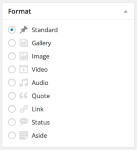
Please do not enter the above into your text editor. The post-129 is the id number of the post on that site, so it wouldn’t be the same for you.
-
I created a post with a link format, then copied the markup of the desired block from the live post and pasted that into my page. It works fine. This post is on my own account, so there should never be a conflict.
As an aside, the link post doesn’t work on my page with the post set as private.
Thanks for your help.
-
Hi!
Great! I’m glad you got the link post working correctly. I wanted to follow up on your point here:
As an aside, the link post doesn’t work on my page with the post set as private.
Can you let me know a bit more about what you mean when you say “doesn’t work”? I published a link post format to the Arcade theme on a test blog, and the post seemed to work alright. If you could explain a bit further, I’ll be able to troubleshoot more!
-
Actually, it was getting a link post working correctly after copying it from the HTML markup of a post, then inserting that markup into a page that I was struggling with.
In the aside, I was only making the observation that, if I made the post private, the HMTL block in the page no longer worked, producing a 404 error. I just found it interesting and thought it might help others who consult this thread, looking for the same solution. It reveals a lot about how WordPress generates CSS dynamically and how that CSS can be used.
-
Hi there,
Thanks for the explanation. Now, I understand a bit more. When I copy the HTML markup for a specific private post and then paste that markup into a page, the markup still displays and does not produce a 404 error. Could you point me to where you’re experiencing the 404 on your site?
-
If you transfer markup from a public post to a public page and then make the post private, the block of markup you transferred to your page will no longer work, instead producing a 404 error. At least that’s what I found. If you are able to reproduce this, please confirm here. I didn’t try transferring markup from a private post to a public page.
Apparently, the current permissions of the original post are reflected for all the posts and pages that use that block of markup, regardless of where it is used, in the entire account. Is both the HTML and CSS affected for a block of markup that is transferred from a post to a page? I didn’t investigate this, but apparently you’re as curious about this as I am.
-
I’ve not been able to reproduce this yet. If you reproduce it again, please post a URL to the page where you have pasted the post markup and are currently seeing a 404 error.
-
Your admin account has more liberal permissions than my customer account. Did you try this with a regular customer account?
-
Yep! I tested this on a normal user account that I have setup. If you experience this again, please send over the link where you’re seeing the 404.
-
The page where the 404 error occurred was on a browser that wasn’t logged in to any WordPress.com account.
I only made the observation because I was impressed with the security model used by WordPress.com. It appeared that part of a post that was initially public when I copied a block of its markup, would no longer be available on a public page where that markup was pasted, if the post was subsequently made private. It made sense, as the block of markup carries a unique ID number for the post.
Too bad you haven’t been able to duplicate. I think we were doing something slightly different that accounts for the different experiences. I’m not sure I’ll have an opportunity to revisit the topic, since my issue was long since solved.


- The topic ‘How do I insert a link into a page using my theme's post format?’ is closed to new replies.
 WordPress.com Forums