

How do I keep my fonts and the color of hyperlinks after changing a blog theme?
-
My blog is located at pejmanyousefzadeh.net. I want to change the theme to Watson. However:
1. I want the header font to remain the same.
2. I want the font for links to pages associated with pejmanyousefzadeh.net (http://pejmanyousefzadeh.net/call-me-pejman/, for example) to remain the same.
3. I want the font for blog titles, tags and the actual text of the post to also remain the same.
4. I do not want the excerpts to be italicized.
How do I accomplish all of this? Thanks.
The blog I need help with is: (visible only to logged in users)
-
HI there!
The settings for all these things are theme-specific, so they cannot be made until you’ve done the theme change.
#1-3 are all font related. Elemin currently uses these font-families for headers by default:
skolar-web,Georgia,"Times New Roman",serif;Then you’ve selected Skolar for the body text. After switching to Watson, you can reselect these fonts in your Customizer, and then add font-family properties in your CSS for any remaining elements that need font changes.
Regarding #4, I don’t see that excerpts are italicized:
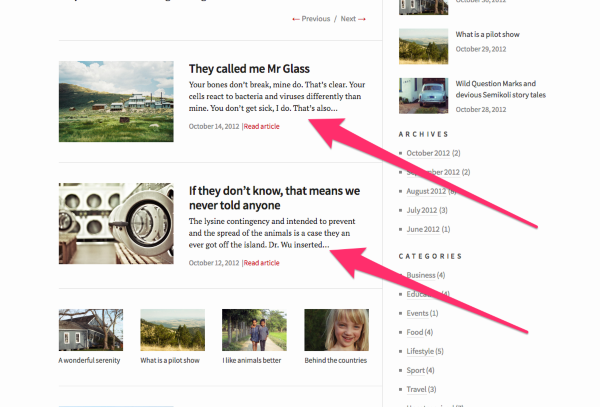
It doesn’t appear that any of Watson’s styles or italicized, unless you explicitly italicize them:
-
Thank you. Where do I click to make these changes, or to see what I have selected for my current theme?
-
To view your Font and CSS settings and/or make changes, you’ll need to open your Customizer here:
https://pejmanyousefzadeh.wordpress.com/wp-admin/customize.php?return=%2Fwp-admin%2F
For the ‘headings’ font you’ll just see “Default Theme Font”, so I used Chrome’s developer tools to find that your current theme (Elemin) was using these default fonts:
skolar-web,Georgia,"Times New Roman",serif; -
This is the CSS that is currently in my editor. However, it doesn’t appear to manifest on my blog. Why not?
.entry-content blockquote p {
font-style: normal;
}.entry-title {
font-family: “Sorts Mill Goudy”, Georgia;
font-style: normal;
font-variant: small-caps;
}.entry-content p {
color: black;
}#main .entry-content a {
color: #660000;
}Also, can I expand the width of text, reduce the width of block quotes, and cause block quotes not to be bolded? Thanks.
-
Additionally, how do I make the title of my blog–which is my name–black, and cause hyperlinks to be underlined and a different color?
-
Rather than analyzing all of your CSS and trying to navigate for examples on your site. Why don’t you tell me what you were trying to accomplish with each chunk of CSS and I can help you redesign it to accomplish that goal.
Typically if you add a bit of CSS and it has no effect, the element you’re trying to select has another bit of CSS from the theme that takes priority, and another selector will be required.
Also, can I expand the width of text, reduce the width of block quotes, and cause block quotes not to be bolded? Thanks.
By expanding the width of text, do you mean expanding the width of the body of your posts and pages? Or increasing the text’s font size?
Since your theme uses a sidebar, and is responsively designed, adjusting the widths of these primary content regions can often have undesirable side effects. But we can try. :)
—
Blockquotes currently have a max-width of 608px. (screenshot)
Here’s code to reduce it to 500px:
.entry blockquote{
max-width: 500px
}—
Here’s code to make blockquotes not bolded:
blockquote{
	font-weight: normal;
}
—
Additionally, how do I make the title of my blog–which is my name–black, and cause hyperlinks to be underlined and a different color?
.branding h1 a{
	color: black;
}
and cause hyperlinks to be underlined and a different color?
Most folks asking for something like this only want it to be the case for hyperlinks they include in their posts. (Not menus, widgets, etc) Here is the code for that:
.entry a{ color: blue; text-decoration: underline ; } -
I actually changed my theme to Minimum. How do I get the kind of newsletter layout that is found here? http://bycommonconsent.com
-
I got the layout, but my pages don’t run across the header as they did in the past. How do I do that, and how do I stop block quotes from being italicized? Once I do that, I am set. Thanks.
-
To have your pages running across the header, you’ll need to create a Menu:
Then set that menu to Minimum’s “Primary Navigation” menu location.
It will appear in this area:
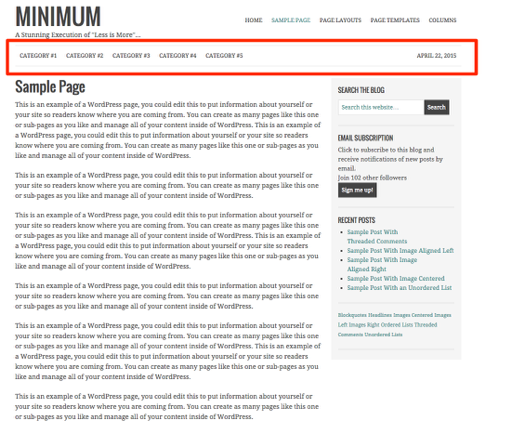
and how do I stop block quotes from being italicized?
This CSS will set blockquotes back to normal instead of italic:
blockquote p{ font-style: normal; } -
-
As a final matter (I hope this is the final matter), how do I make the text of my posts–including block quotes–darker? I presume that there must be CSS for that. Thanks.
-
-
#000000or you can just use ‘black’ instead of a hex value. Some color names are keywords in CSS:
-


- The topic ‘How do I keep my fonts and the color of hyperlinks after changing a blog theme?’ is closed to new replies.
 WordPress.com Forums