

How do I make and save changes using CSS?
-
I’m using the Motif theme, purchased the Custom Design, and know how to access my blog’s CSS Editor. I’ve been researching how to change my site-title color, and make the white “home” box on the featured image semi-transparent. Anytime I copy character by character a CSS code into the editing box, nothing happens. I thought changes happen automatically…preview style? I then discovered how to access Google Chrome’s “inspect element.” I found where to change the color of the site-title, changed the color, and automatically, it changed on my blog. I went to save the change, and the title went right back to the original color. So, two part question: Am I able to make changes directly in the WordPress CSS Editor or do I have to use web browser’s as well? And 2, if I use web browser’s CSS, how do I get it to save?
The blog I need help with is: (visible only to logged in users)
-
Hi there,
Regarding the CSS editor, you should be able to make changes in the editor and have the changes reflect immediately on the screen. When you save those changes, they should be reflected on your site. In order to change the color of the site title, you can use this code:
.site-title a {
	color: #ff5e5e;
}
To be clear, please replace all of the current text in the CSS editor that is commented out using /* and */.
Can you give that a try and let me know if that works?
Regarding the transparent background, that question is best suited for our CSS forum here:
https://en.forums.wordpress.com/forum/css-customization
We have some expert CSS ninjas that monitor those forums. They’ll be able to provide you with the best options!
-
Thank you so much!! That worked perfectly!! I’ll post on the forum in regards to the transparent background.
So if I want to change the tagline, or any other text color, how do I refer to it as? I tried copying the same format as the site title, only instead I wrote tagline…however it didn’t do anything. Is it always written the same way, just the reference is different? How do I know what the correct reference name is for other pieces of text, boxes, etc.?
-
Hi there,
You’ll need to find the correct selector. In the case of the tag line, the right selector is:
.site-descriptionAs shown here:
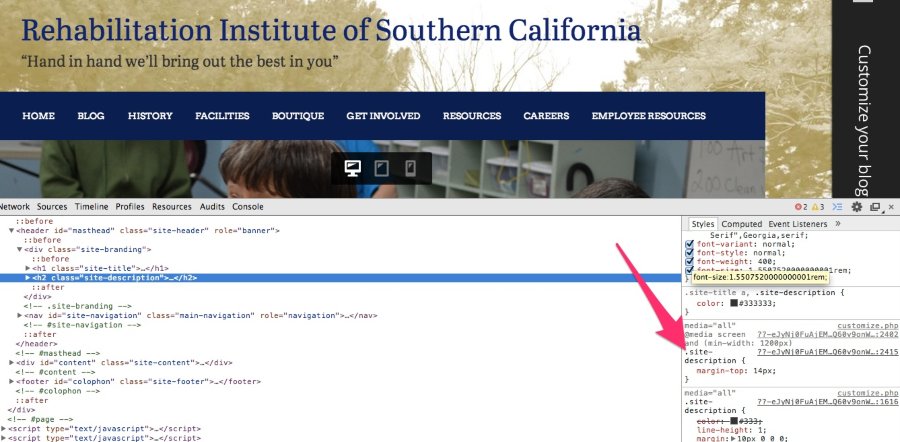
So, if you use the following code, you should be able to change the site description:
.site-description {
color: #hexcodehere;
}
Finding the appropriate selector can take some time initially. Here’s a pretty awesome support document that explains the process a bit more:
http://en.support.wordpress.com/custom-design/css-basics/
Take a look, and let me know if you have any questions!
-
Awesome! Thank you so much!
I was able to change the alignment as well on those, and am now working on changing header colors. I was able to change the color for all of the headers in the navigation bar, except “Home.” Working on trying to find that one…not sure why it didn’t change with: .main-navigation a { color:…etc.
-
It actually did change, but the theme is set to highlight the current page in white. You’ll notice when I move to your blog page, the “Home” header changes to the custom color as shown here:

You can change the active page color with this CSS code:
.main-navigation li.current_page_item > a {
	color: #hex;
}
Let me know if you need anything else!
-
-
-
Hey! I’d like to remove child pages from the navigation menu, so that people can only access those pages via a link on another page. I’ve found where to locate the number of each page, however, I don’t know how to make the PHP change in order to exclude those pages from the menu. Would you be able to help me with that?
I’ve referred to other forum postings, and this link: http://codex.wordpress.org/Template_Tags/wp_list_pages
Where do I find this code: <?php wp_list_pages();?> ?
Thank you!


- The topic ‘How do I make and save changes using CSS?’ is closed to new replies.


 WordPress.com Forums