

How do I make my header image take up the proper amount of space?
-
Having great difficulty getting header image to look right with Sight theme. It only will fill up a small space in the upper left corner of the title area. I thought the header image was supposed to be under the page tabs? This is not so on my site. I even tried troubleshooting with header images from other WordPress blogs just to see if anything would work. Still not working.
The blog I need help with is: (visible only to logged in users)
-
Hi there,
It looks like you were able to figure this out? This is currently what I am seeing:
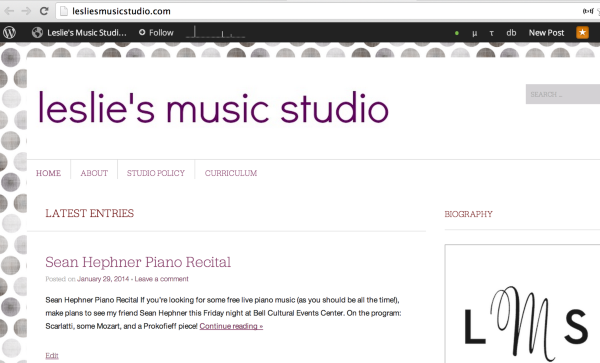
Please let me know if you have any questions!
-
I guess I did sort of figure out how to get the text how I wanted it by using an image of the text. But I’d still like to have a photo on the home page like It shows on the Sight Theme wordpress example. On their example it shows pictures under the page links/tabs. How do I get that there?
-
The image below the header is actually the Featured Slider.
Sight displays up to 30 of your latest sticky posts that have featured images in a prominent slider on the front page. To add a post to the slider, mark it as sticky and give it a featured image.
You can find more information about that here:
http://theme.wordpress.com/themes/sight/
Cheers!


- The topic ‘How do I make my header image take up the proper amount of space?’ is closed to new replies.
 WordPress.com Forums