

how do i make photos appear in normal size when clicking on them from my blog?
-
When I click on an image posted in my blog, it takes me to a separate page showing just the image, but the image is HUGE. I need it to be smaller when I click on it from my blog. It used to always appear in normal sizes — when I clicked on a photo, it took me to a separate browser window showing that image bigger, but still a normal size. Now, for some reason, every photo is huge.
The blog I need help with is: (visible only to logged in users)
-
It looks like you are linking to the image file, rather than the attachment page, when you are adding images to your posts.
When you add a new image, once you have the image editor open you will have an option on the right side of the screen to link to the image, which will fill the screen if large enough, or to the attachment page, which displays the image in a page within your blog.
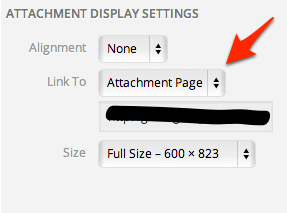
If you change your image links to attachment pages in the future, you shouldn’t run into this again.
-
Hi again,
Thanks for your response. But I’ve never had this problem before and so in the past since the images showed up in separate windows in normal sizes when I clicked on them from within the blog, I would imagine they were linked to an attachment page — whatever the default was was what I did, and I had no problem. But now, even with images I posted months ago on my blog, when I click them, they’re huge in separate windows — even though I did not go in and make any changes to those photos. So it’s something with the display settings I think, rather than the uploading settings? This makes me think I inadvertently changed some setting that affected all the images? I’d like all my previously posted photos to show up normally, and there must be a way to get that back to normal without going through each photo and changing something. Do you see what I mean here?
Could it be something with my Media Settings and the image size settings there? I think I have the default settings; thumbnail 150, medium 300, large 1024.
I appreciate your help, I’m finding no answers on this and don’t know what to do next.
-
It looks like throughout your blog, you have images both linked to attachment pages, like this:

(in http://cabinetsofwonder.wordpress.com/2013/01/02/storytelling-is-very-much-alive/)
and to the media file, such as here:

(in http://cabinetsofwonder.wordpress.com/2013/01/13/stories-of-beauty-stories-of-destruction/) -
I guess so. But before the other day, I never saw the attachment page images — I always saw them open up as media files on a separate page, like the second example you put above. And when that happened, they would open up in a normal viewing mode and I could see the whole image without it being so huge like it is now.
I have no idea why all of a sudden it’s not consistent anymore (i.e. not all linked to the media files) and also why, in either format, the images are huge when I open them. Do you know why this has occurred? I would like to understand and to make it go back to the way it was. And also, this is my first time on a WordPress forum, do you work at WordPress? Is there someone I can contact directly to get help with this ASAP?
Thanks.
-
I do indeed work for WordPress.com.
I can’t really explain what you may have seen in the past. We have had the option to choose between media files and attachment pages for a long time. The links to attachment pages won’t open the images as huge photos, but instead show the images within a page on your site. If you click on the image within the attachment page link, it again will bring up a media file.
The only recommendation I can make for you is that you should always ensure that “attachment page” is selected when you add images to your blog posts.
The images will always be full size in the media file link. It could be that in the past, you weren’t uploading images of the same resolution, and if the files were smaller to begin with, then they would not have shown up as large when the media file was displayed.


- The topic ‘how do i make photos appear in normal size when clicking on them from my blog?’ is closed to new replies.
 WordPress.com Forums