

How do I make the headings (pages) bold?
-
Something has gone amuck with my blog and the pages titles, as well as the text in the sidebar, seem faint. I have fooled with the customization/fonts but to no avail.
Is there a CSS code I might use to make them bolder?
The blog I need help with is: (visible only to logged in users)
-
-
-
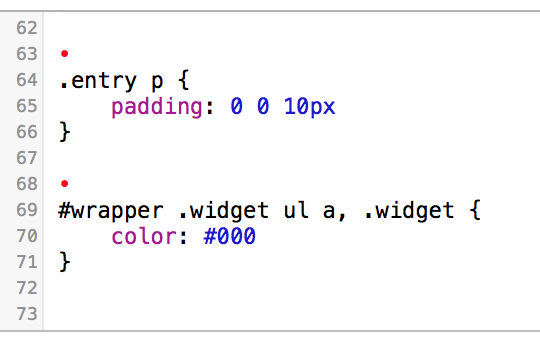
I don’t see the CSS I provided in your Custom CSS area. Keep in mind, the changes are pretty subtle. You could temporarily switch the color in the snippet above from black to green to see the changes more prominently.
-
I had to type them in…apparently you can copy and paste. And yes they are indeed subtle, but thanks for your help. I don’t low what happened but they are lighter than before.
-
Well I tried colors, as in red, green, etc., and apparently that coding does not work. Any other suggestions?
-
I am totally confused now….sorry. I deleted those lines and the red dots as well…nothing has changed.
-
I know that my links and type in both columns were darker before. Not sure what happened to change that?
-
@disc440, I looked through your custom CSS and found an orphaned closing curly bracket within your CSS. I removed that orphaned bracket, but I’m seeing a few other syntax issues.
You have two selectors and two opening curly brackets here.
.comment-body {.comment-body {
	font-size: 14px;
}
It should look like this
.comment-body {
	font-size: 14px;
}
Below the above is an orphaned font size declaration and closing curly bracket. Remove the following from your custom CSS.
font-size: 14px;
}
You have two selectors here also with the second opening curly bracket.
#comments-title {#comments-title {
    color: #cc0000;
}
Make the above look like this
#comments-title {
    color: #cc0000;
}
Make the above changes and then we can continue and get things looking like you want them.
-
Thanks right now my fonts are screwed up AGAIN. Second time I click on the blog and the fonts are different. When I go to customize/fonts the page looks correct before I even do anything, but even I do correct the fonts it still shows differently in IE and Firefox.
I am not the brightest but I will take the responsibility for this problem with changing fonts.
-
I have made the changes you requested, but forget the bold type….can get my original fonts back? They are CHUNK, normal and Tacit Web, large.
-
-
No, I am not seeing CHUNK. I think it’s all I FacitWeb. Same on my wife’s pc and on my ipad.
-
When I go to “customize” and click on “fonts”…the blog looks as it should, but when I get out of that it does not.
-
Ah, I’m seeing it now. I set your body font back to the default and reset it to factiweb large and it seems to be working now. Check your site and let me know if you are now seeing your fonts correctly. Check in both browsers, and if you don’t see it, clear the browser caches and force-reload the site.
Let me know how thing go.
-
Sorry…..still the same. CHUNK is not showing.
Curious it shows fine when I go into customization……?
-
Hi, I’m seeing Chunk in Chrome, Safari and Firefox for headings.
The Customizer doesn’t use the normal browser rendering because we have to have complete control so that we can provide live preview.
Are you not seeing Chunk in FF or IE, or both?
-
I have checked IE and Firefox….I do not see Chunk. The first font should be Chunk, normal. The second is Facitweb in large.
All I am seeing is Facitweb, period.



- The topic ‘How do I make the headings (pages) bold?’ is closed to new replies.
 WordPress.com Forums