

How do I move text from post to page?
-
I have tried to put a page on but it keeps going as a post onto my main page. Three times now this has happened so I have saved them as draughts.
The blog I need help with is: (visible only to logged in users)
-
Hello there,
I see your drafts. You have created Posts instead of Pages. In order to create Pages, you must do so here:
https://wordpress.com/stats/day/gazsouth.wordpress.com/
Click on “Add” next to Pages in your left-hand column. You will find that here:
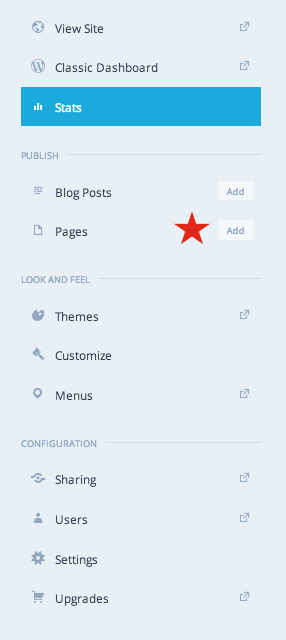
I hope this helps! If you have any other concerns, drop me a note. Thanks much!
-
Hi Robyn, thanks for your help. I can see now how to make a page, I did this before by going to pages and clicking on + but now when i do this they go to posts and I still can’t convert my draft posts to pages. Any ideas? thanks, Gary
-
Hi Gary,
Good to hear from you.
Posts and Pages are created in two different areas.
If you create a post, it’ll be added to the post list.
If you add a page, it’ll be added to your page list.
The two do not intersect/overlap. It’s an apples/oranges situation :)
I still can’t convert my draft posts to pages. Any ideas?
There isn’t a way to “convert” a page to a post, or vice versa. If you want to create a page instead of a post, you’ll have to copy your content from your draft post, then click Add a New Page, and paste your content onto a page instead. Then, save your page.
If you have any other questions about this manual process, let me know. Thanks!
-
Hi Robyn
Thanks again for your help. I’ll try the copy and paste method. Still not sure why when I go to pages and click on + for a new page it appears as a post.
Happy new year
Gary
-
Gary,
Still not sure why when I go to pages and click on + for a new page it appears as a post.
I can’t make this happen, and I’m not sure why it’s happening to you.
If you want, you can take a screen recording of your actions (clicking Pages → Add New → Creating a test page → clicking save), so I can see what is happening on your end.
If you don’t mind spending the time with this, it’ll help me get to the bottom of what’s happening to you.
If you haven’t done this before, you can find the instructions here:
http://support.apple.com/en-us/HT201066Scroll down to:
Recording with QuickTime PlayerAnd follow the instructions in the section:
Record your screenOnce that’s done, you can upload the video to your Media Library in your dashboard, and I can access it from there.
Let me know how you want to proceed! Thanks, Gary. Happy new year!
-
Hi Robyn, I’ve still not resolved this problem although I might add that I’m using your app on the i phone. If I log in on a pc I can create pages and posts. I’m going to try on an i pad soon to see if that makes any difference.
Regards,
Gary
Gary South
Mobile 07850 465274 -
Hiya Gary,
Aha! That is indeed one of the problems…pages are not editable on the mobile app. This makes more sense to me now. The mobile app is geared toward those who want to post from a mobile device, rather than edit static pages.
Could you let me know how everything works out for you on the laptop? If you’re having trouble there, I’m concerned, and would like to help fix things.
Looking forward to hearing from you. Thanks very much.


- The topic ‘How do I move text from post to page?’ is closed to new replies.
 WordPress.com Forums