

How do I remove the comments bar from my pages in Linen theme?
-
I have thoroughly searched the community forums and cannot find a way to remove the comments bar from the bottom of my pages – static or otherwise – in the Linen theme.
The blog I need help with is: (visible only to logged in users)
-
Hi there! You can deactivate those comments by following the instructions listed here:
http://en.support.wordpress.com/enable-disable-comments/If you have questions about this process at all, please let me know! Thanks much.
-
Were it only so easy…. It may be different with the theme I am currently using. There is no easy toggle on/off switch in the Discussions editing menu. It is a long page of choices and options, none of which offer on/off.
I’ve searched pretty thoroughly. Ideas?
thanks. -
Hi Tim, I think you might be looking at your Discussions page under settings, rather than the discussions module in your Page Editor.
Try this: Click Pages → All Pages in your site’s Dashboard. Open up one of your Pages in the editor. Scroll down the Page until you see the Discussion module. It will look like this:
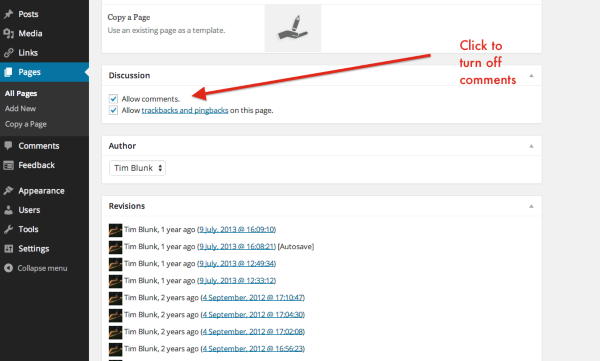
You can click to disable comments and then click Update to save the changes on your page. This must be done on each page.On the off chance that you do not see a Discussions box, it is hidden from view. To make it visible, click on the Screen Options tab in the upper right-hand side of your page. Select the Discussion box. Once that is done, you can scroll down your page to adjust your Discussion settings.
I hope this helps! Take care.
-
Hi, again. I had tried all of the options that had anything to do with “Discussions” and never saw anything like the screenshot you sent me.
I realized that I had to go to the Pages editor as you indicated (had tried that many times) and go to the Screen Editor to turn the “Discussions” back ON in order for the box to show up again. It took a few refreshes for this to take. Then it took me a while to see that the Discussions box was at the bottom of the page. I scrolled down by accident and saw where it had reappeared.
In any case, I was successful in turning off the comments box.
I appreciate your feedback and help. WordPress is great, although some of the user interfaces like these are a tad clumsy at times. Your support is terrific, though. Thanks so much. -
Fabulous! I’m so glad that worked out for you. Sorry it felt clunky. You can always leave any suggestions you have about improving WordPress.com in our Ideas Forum. We really do like hearing what our users have to say. We want you happy! Here’s a link, if you choose to leave any suggestions:
https://en.forums.wordpress.com/forum/ideasThanks again. All the best!


- The topic ‘How do I remove the comments bar from my pages in Linen theme?’ is closed to new replies.


 WordPress.com Forums