

How do I remove the grey borders from my pictures?
-
How can I remove the borders of an image in the new wordpress interface?
Hi guys,
Here’s the problem, I wasn’t on my blog for a long time and you guys seem to have change the interface of WordPress. Before I was able to take out the borders of my images in my articles, how I can’t do it (or find an answer). Can you help me? Please? :)
The blog I need help with is: (visible only to logged in users)
-
Hi there!
You can remove or add the border by inserting style=”border=0px;” in the HTML as shown here:
<img class="alignleft size-large wp-image-15039" style="border:0px;" src="URL" alt="Featured Image -- 15038" width="584" height="389" />Just adjust the number 0 to how thick you want the border to be. To be clear, you will need to adjust the image code in the Text Editor. This is explained here:
Let me know if you have any additional questions!
-
-
-
Hi there,
Just an update, I have great news.
Our developers have added border and margin options to the Advanced Options as seen in the screenshot below:
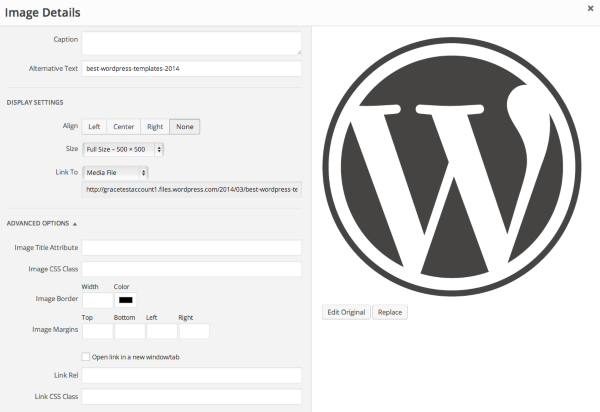
Cheers and Happy Blogging!


- The topic ‘How do I remove the grey borders from my pictures?’ is closed to new replies.


 WordPress.com Forums