

How do i remove white spaces on the side of of my blog?
-
hi friend,
thsi shows a blog that i have taken a screen shot without asking permission from owner (please accept my applogies)
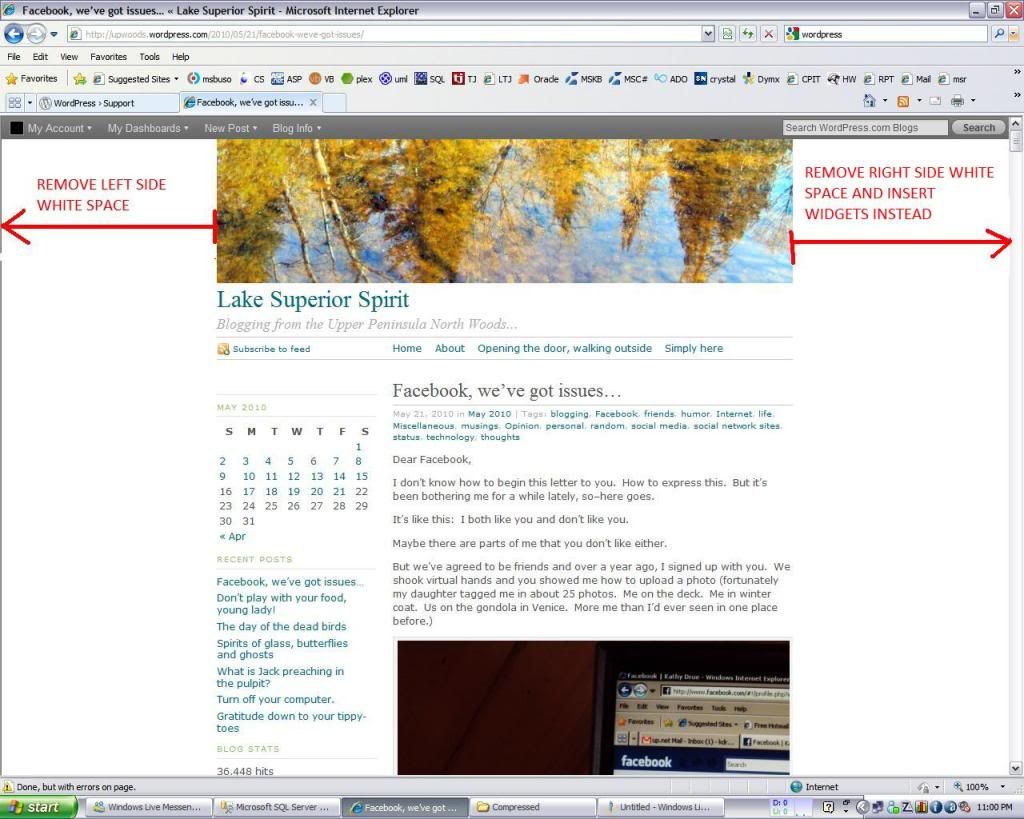
in it for clarity i have add two arrows one to the left and another to right that shows the empty spaces that i want to remove, how do i remove these whites space so i can get more space for the writting content on my blog?
thanks
The blog I need help with is: (visible only to logged in users)
-
-
-
YOu don’t understand. There isn’t a hand-holding service for CSS: it’s something that you need to learn on your own and practice, and when you’re good enough to make the changes you want, you buy the upgrade. Don’t buy it if you don’t already know how to make the changes.
-
If you have CSS editing experience, you can get the paid custom CSS upgrade and renew it annually. It will allow you to stylize the appearance of themes you find here > Appearance > Themes, but it does not allow you to change the functionality, by editing the underlying template. Also note that CSS is theme specific, so you cannot use the CSS stylesheets from other themes with the themes here at wordpress.COM.
Since there is no official Staff support for the CSS upgrade, and precious little Volunteer support, I recommend that you don’t buy the upgrade unless you have at least moderate understanding of HTML and CSS because you must be prepared to do the work on your own.
If you are considering purchasing the upgrade, you can go to Appearance > Edit CSS. There wordpress has provided a preview function where you can try before you buy.
http://en.support.wordpress.com/custom-css/


- The topic ‘How do i remove white spaces on the side of of my blog?’ is closed to new replies.


 WordPress.com Forums