

How do I stop pictures clicked from displaying a different picture?
-
When I click on a photon from my site pages, a different photo of mine is enlarged instead of the one I click.
The blog I need help with is: (visible only to logged in users)
-
Hi there,
Can you show me an example of this? I tried clicking on a couple of your posts and found that the photo did enlarge into that same image.
If you could provide me the link I’d be happy to take a further look.
Cheers!
-
Yeah, on the main page the photos show up fine when they are clicked. Yet under my menus (2014, 2013), those photos show up differently when they are clicked. Is that the case for you too? Even from other computers it isn’t working for me.
-
Hi there,
Yes I am able to see that. Here’s an example:
http://sydneymorrison.com/2014-2/
So, it looks like the top three images are linking to:

I checked those three images and found that you set the images to link to a custom url, which is that image above.
So, please edit the post and edit the image by clicking on it and clicking on the pencil icon. Where it says, Link to, please change it from Custom URL to Attachment page. This is what it currently looks like:
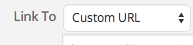
Let me know if you have any questions with this!
-
-


- The topic ‘How do I stop pictures clicked from displaying a different picture?’ is closed to new replies.


 WordPress.com Forums