

How do I stop WP inserting random "http://" into the text of my post?
-
I have an example that states “ping http://www.example.com” However, worpress wants to turn this into “ping http://www.example.com” WHICH IS WRONG. How do I stop WP doing this? I have a blog that I can’t publish until this is solved. I’ve already tried putting it in
ping www.example.com
but it still changes it to http://example.com
The blog I need help with is: (visible only to logged in users)
-
OMG I can’t even post my question without it getting screwed up!!!
Please look at the SOURCE of my question to be able to read it
-
Hi there,
What you can do is switch to the Text Editor and add this instead:
<a href="http://www.example.com" title="example.com">www.example.com</a>This will make the link into: http://www.example.com without the http:// in front.
Cheers!
-
Grace – thanks for your suggestion. I did think of doing that, but then it still appears as a link. I don’t want a “href”. To illustrate, I’ll use commas instead of periods.
Your suggestion will make my text appear as:
ping www.example.com
I want it to appear (replacing commas with periods)
ping www,example,com
Is WordPress competing with Apple in the “we-know-what-you-want-better-than-you-do” stakes by FORCING me to use links when I don’t want to? I HOPE there is a way of overriding the default behaviour – I really thought that I really thought that
...
tags SHOULD have done the job.
-
Hi there,
There are two things you can do. You can just take out the www. so instead of http://www.example.com, just put example.com.
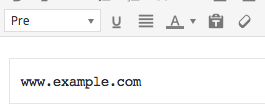
If you want the www. there, select the link and instead of Paragraph, change it to Pre as seen here:
-
ARRRGH- This forum website is even more frustrating than writing a blog post. And it has no preview, so I don’t even know if what I’m about to say will even display.
I tried to explain in my last answer that I had used the Pre tags – but the stupid parser took out my reference to the pre tags, even though I had used the correct html names for the less-than and greater-than symbols around the tags (it is hard to write about stuff that you know is going to be stripped from your post as soon as you hit submit).
Anyway – I solved the problem. Here goes – if this does NOT turn out properly, I’ll do a blog post to explain more fully. (why doesn’t this forum have a preview?)
It turns out that you have to write http://www.example.com as www.example.com
-
Hurray! It worked.
It turns out that you have to write http://www.example.com as www.example.com -


- The topic ‘How do I stop WP inserting random "http://" into the text of my post?’ is closed to new replies.
 WordPress.com Forums