

How long will the Classic Editor be available?
-
@supernovia said,
For now, one thing you can do (and which I would guess will always be available) is switch to text mode.
In response, @guitarsophist said,
I am not sure how to get into “text” mode. Is that in Gutenberg?
and later indicated that he still didn’t know how to get into text mode in Gutenberg, saying:
I didn’t have the problem you had with multiple blank lines creating a blank block, but maybe this is not the “text” mode you were talking about.
So these questions posed by @guitarsophist have not been answered:
1. Is there a text mode in Gutenberg, aka the WordPress Editor, aka the Block Editor?
2. If there is a text mode in Gutenberg, aka the WordPress Editor, aka the Block Editor, then how do you switch to it. -
Am I missing something here? Doesn’t the Block editor give you the choice of visual or HTML via the three dot menu whilst the Classic editor calls the same things visual or text?
-
Thanks @musicdoc1, and thanks @guitarsophist.
About the name, Gutenberg is just the project name. When I’m talking to users I try to only use the term Gutenberg if they do, and then it’s just to keep things less confusing. Generally though, it’s called the WordPress Block Editor. So going forward in this thread, we can call it that if it helps.
https://developer.wordpress.org/block-editor/And, the block editor does have a code editor. And I shouldn’t call it an HTML or Text editor because if you start an article in visual mode, you’ll clearly see that the code generated isn’t your typical HTML or text.
That said, if you /start/ by typing your text there, then switch to Visual, currently you’ll end up with one big classic block. Here’s how to access the code editor:
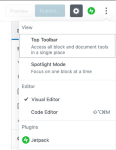
Still, personally, if you’re starting in a different plain text editor and pasting, I’d recommend pasting into visual so that you do have separate blocks to work with — once you get used to them they’re actually pretty nice for editing, IMO. Even if you’re mainly writing blog articles.
And if you use dashes for bullets and what not, it should format nicely, even when pasting directly to visual.
-
-
@supernovia When using the Block editor can you clarify the differences (if any) between the Code Menu found via the three dots menu top right and the HTML editor found via the “more options” three dot menu within a post?
-
-
Yes, I knew about those options. I just never called the code view “text” because it had both text and html codes in it. It was more like the “reveal codes” feature in WordPerfect.
Once upon a time, I used to code simple webpages in Windows notepad. Yes, I’ve been at this a long time. I will survive “WordPress Block Editor” though to tell the truth, it does not seem like quite the right thing for the purpose, nor quite ready for release.
thanks for the help,
John -
I did a major revision to the post (dumped the gallery block and replaced it with three image blocks). After doing this I hit “preview” and it showed me the already posted version, not the revised one. This means that “preview” is functioning not as “preview,” but as “visit post.”
It would be nice to have an actual preview of what the modified post will look like before actually updating it.
This feels like doing QA on beta software.
John
-
Hm, well that’s definitely not something I’ve experienced, I wonder if something cached it in your browser?
First, please make sure that your browser is up to date: https://browsehappy.com/
If it is not, please try updating your browser or switching to a different browser.
If it is, please do these two things:
1. Try clearing your browser’s cache and cookies.
2. Try with all browser extensions or add-ons temporarily disabled.
Please let us know how each step goes for you, and which browser (and version of) you’re using if you’re still having trouble.
-
My browsers are all up to date. However, preview works as expected in Chrome. In Firefox, it started working after I had experimented with Chrome, though when I tried to leave the test edit, it asked “Are you sure you want to unpublish this post?” I checked to see if it had actually published the post rather than merely previewing it, but it had not.
I think that the problem may be with uMatrix, which I run in Firefox, but not Chrome. I had permitted all the necessary cookies for running WordPress smoothly, but the block editor seems to have added some new cookies that were not permitted.
I think you are right. A Firefox plugin was the main difficulty in this case.
Thanks,
John -
Yeah, I use Firefox almost exclusively here and haven’t run into that issue, so a Firefox add-on sounds about right. :)
-
I just found out that it is a mistake to try to edit a post done in the classic editor while you have the block editor enabled. If you do, it turns bullet lists into paragraph blocks with one bullet at the beginning. If you turn it into a list block, all the formatting goes haywire. All I wanted to do was add a link to another post, but I would have to redo the whole thing.
I managed to do it by clicking on Posts/Add New Post, then changing to classic editor, then closing the new post and opening the old one. Perhaps there is a better way, but it seems that the block editor is dangerous to old posts.
Thanks,
John -
Does it prompt to ask you if you want to convert to blocks first? In the the past I’ve seen that.
-
I have seen that too, many times, but in this case it did not ask. I think it was because I started this post in the block editor, gave up , undid everything, switched to classic mode and pasted in again. The block editor probably remembered that it had once been blockified.
I think at this point I am going to leave it in classic mode. The block editor is too inflexible, almost ideological in insisting how things should be done. It is an engineer’s vision of writing (nothing against engineers). What if you wanted to write a poem? The block editor would put each line in a separate block. Or you could use a classic block, but the block editor would ask you to blockify it every time you opened it. I guess you could write it in a wordprocessor, save it as a .png, and post it as an image.
But why spend all this time thinking of kludges and workarounds? It is clearly not good to switch back and forth from block to classic, so I think I will stay in classic while researching another platform. I have four blogs, but only one has content that is worth moving. I might leave that one here, but stop adding content, delete the others, and start over somewhere else. It will be an adventure!
I am sure the block editor will serve some people’s needs better than it does mine.
Thanks for all your help.
John -
All I wanted to do was add a link to another post, but I would have to redo the whole thing.
I managed to do it by clicking on Posts/Add New Post, then changing to classic editor, then closing the new post and opening the old one. Perhaps there is a better way, but it seems that the block editor is dangerous to old posts.
Why not switch directly from the block editor to the classic editor, restore a previous revision if necessary, and then add the link. If the post hadn’t been updated, then restoring a revision might not have been unnecessary. See the answer to the question Will I still be able to use the old editor? in the FAQ section of the WordPress Editor support page and the Restoring Revisions section of the Page & Post Revisions support page.
doc
-
I think it was because I started this post in the block editor, gave up , undid everything, switched to classic mode and pasted in again. The block editor probably remembered that it had once been blockified.
What rather happened here is that when you copied your code from the block editor, you also copied the markup used to create blocks in the HTML, so you copied that into the classic editor along with the text without realising.
What if you wanted to write a poem? The block editor would put each line in a separate block.
Have you tried the Verse block, which was specifically designed for writing poetry? If you press Enter within that block it creates a new line inside the block, and it also preserves extra line breaks and spacing, similar to use preformatted text in the classic editor.
The block editor is too inflexible
One could potentially create a different type of block for every type of content imaginable, which would allow anyone to use any kind of layout without having any knowledge at all of either CSS or HTML. So in fact the block editor is infinitely flexible. We just have to give time for the different types of blocks to be created.
And as you’re in the Premium Plan you can also add your own classes to individual blocks, which you can then target with custom CSS to change how it looks – no more digging around in the browser inspector to find the right CSS selectors.
-
I did not know of the existence of the verse block, but I don’t think “there’s a block for that” is a good design solution. I have one post up that is a science fiction short story written entirely in business memos, chat logs, and emails. I imagine that one could create blocks with templates for all of those things, but would that be the best way of doing that? Especially when it is all easy to do in the classic editor?
You may well end up with nearly infinite blocks, each its own mini design universe. I counted 39 on the block editor support page. I am sure you will end up with many more. That is why you need a search function in the block selection menu. I would argue that the fact that you need a search function there is itself an indication of questionable design principles, a kind of red flag.
I don’t know CSS. CSS is where I stopped designing web pages. I don’t really want to learn at this point. I’d leave that to professionals. But I shouldn’t have to know CSS to use a product like WordPress.
Anyway, I don’t want to argue. Automattic is clearly totally committed to this path, so users can either live with it or leave. This is a support forum, so this conversation is getting off topic.
Thanks,
John -
Thanks John. I really don’t want to argue either, and appreciate the feedback here.
If I’m hearing you right,
it would be nice
to just write
the way you want to… without having it create a new block every time you press enter, and without having to pause to pick a block.
Personally I use shift+enter as a cheat (though it doesn’t currently work on android), but I’m glad you’ve expressed it. We do pay attention to this kind of feedback and get it to our developers. It’s unlikely to mean we’ll get classic forever, but I hope we can use it to make the block experience smoother.
You’re right about some other things too: the blocks at the back end are in fact designed to keep the code separate, in their own universes of a sort, so that we can safely allow more diversity of code and features with less worry of whether this feature or that will play nicely together. We’ll keep trying to make it a smoother experience.
And this:
I shouldn’t have to know CSS to use a product like WordPress.
Agreed. We’ll keep trying to make it more robust AND easier to use. Thanks again for the feedback. And I’m sorry if in our efforts to explain it’s come off like we want to fight you. Thanks for blogging with us.
-
Yes, that is pretty much what I am looking for, and pretty much what the classic editor does, though it is no holy grail either. I often had to go into the html mode to get what I wanted.
I don’t think that you have been fighting me. The support folks have been great! It is the block editor I have been fighting with. But I have given up that fight. A smoother block experience is still a block experience and that is a fork in the road that I do not want to travel. I tried it, though I did not go beyond the point of no return.
Thanks,
John


- The topic ‘How long will the Classic Editor be available?’ is closed to new replies.
 WordPress.com Forums