

How to activate posts slider on Sight theme
-
1 – I’ve just switched my blog’s theme to “Sight” which appears to come with the post slider feature but I’m unable to activate it.
2 – The background I configured (with tiled image) shows on my computer but is not visible on others. They only see a white background.
Kindly assist.
Sincerely,
Mitch -
Hey there, Mitch!
Here is a link to your theme’s support page:
https://wordpress.com/themes/sight/Check out the Featured Slider section — it describes how to set up your slider.
If you have questions about how to make your posts sticky, or how to set featured images, let me know!
That should do the trick! If I can help in any other way, please drop me a line. Cheers :)
-
Thanks for your response. Let me first get cracking on the slider then I'll take you up on the sticky posts as am totally at sea. Best regards Mitch
-
Hi Robyn,Sorry to report that your suggested link takes me to the list of sliders available for respective themes and I've been there before contacting you.
First off, I was and still am under the impression that my “Sight” theme incorporates the slider feature but it appears I'm being subtly nudged into buying it. Although I haven't been sent to an actual purchase link so far, clicking one of the sliders listed (including the free ones without price tags) and then “Activate” takes me to the customization page of another theme altogether. This is getting frustrating because I chose this theme partly because of its slider feature and I've already customized it extensively to my blog.
All in all, I guess I require further assistance.Many thanks in advance
Mitch
-
Update on previous…
I’ve now succeeded in selecting the “Sight” slider from the list and then hit “Activate” when prompted on the next page but after that nothing. The system did look busy “activating” it for a while and that was it… no more prompts and no new page or dialogue opened.
I actually rushed over to view the live blog hoping to see the slider already on but there was nothing.
Then, I went to the widgets section of my dashboard thinking it may have been added to the population there but it wasn’t….
What next? Kindly advise.
Thanks -
Hey Mitch!
Per Sight’s instructions, only posts that have been made “stick” will appear on the slider.
I don’t yet see that you’ve made any of your posts sticky. Although, you have lots of posts, so I haven’t seen the classifications of all of them!
If you aren’t sure how to make your posts sticky, here’s some info for you:
http://en.support.wordpress.com/posts/post-visibility/#sticky-posts
Try that out. Let me know how it works for you.
Thank you!
-
Thanks Robyn!
Its done the magic. After trying to get the slider feature to work on several themes that I like, I was getting rather frustrated as I had never utilized the “Sticky” feature either.
You’re truly the “Happiness Engineer”!Warmest regards,
Mitch -
Oh hi again, Robyn!
One quick-fire question while you've still got my back…(lol)
If yo can kindly take a look at my site http://www.theafricaneye.com you'll see immediately under the slider “LATEST ENTRIES” – is it possible to edit or eliminate that outright as it doesn't quite blend-in with the newspaper feel of my blog?
I've tried to find a way of getting rid of it but so far no luck as none of the editable menus talk about it. Unfortunately too, am no good at CSS and HTML so if you can point me in the right direction, that will be appreciated.
Many thanks,
Mitch. -
Hi Mitch,
The only way to get rid of that header would be through using CSS, which would require the Custom Design upgrade. If you would like, you can purchase that upgrade here:
https://theafricaneye.wordpress.com/wp-admin/paid-upgrades.php
Alternatively, you can start a free two week trial using the “Try Now” button beside the upgrade.
Once you’ve activated the upgrade, you can eliminate the header by placing this code under Appearance -> Customize -> CSS:
.latest-posts-header { display: none; } -
-
Hi Jeremy,
I’m presently in the CCS but can’t locate the “latest-posts-header” so that I can insert “display none” as you advised.
I’ve seen things like “style – display none” but nothing referring to”latest posts” or “posts.” -
Hi Mitch!
Once you’re in the CSS editor, just copy and paste the whole code Jeremey provided:
.latest-posts-header {
display: none;
}
Then it will adjust the preview as well, to look like this:
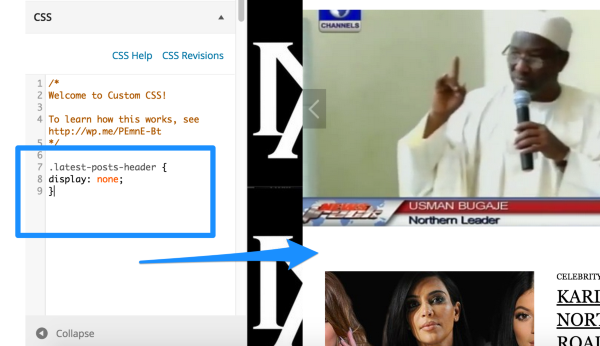
-Alex G.
-
-
Hi Alex,Sorry for the inconvenience. I've just downloaded the Facebook pop-up plug-in but it doesn't come with instructions and I wonder if you would be so kind to show me how to go about it
-
Hi Mitch,
WordPress.com does not offer the option to install third-party plugins, that is only available on self-hosted sites running the free software from WordPress.org
This page explains the differences between WordPress.com and WordPress.org in more detail, if you’re interested:
I tried looking for the Facebook pop-up plugin you mentioned, but I’m not sure specifically which one you want to use. In general, we don’t offer pop-up functions on WordPress.com. But we do have several other ways you can feature Facebook on your site:
https://en.support.wordpress.com/facebook-integration/
If you can send me a link to the specific plugin you have, I’ll see what we can and can’t do to provide similar features on WordPress.com.
-Alex G.
-
-
Hi Mitch,
This forum doesn’t support any attachments. Can you copy and paste the link from where you downloaded the plugin instead of attaching the plugin itself?
Many plugins (but not all) are listed in the WordPress.org directory, is it found there?
https://wordpress.org/plugins/
-Alex G.
-
-
Thanks for the link! :)
So this plugin displays the Facebook Like Box as a pop-up before readers can view your site. Like I mentioned before, we don’t support pop-ups, but we do offer a Facebook Like Box widget that can display the same information in your Sidebar:
https://en.support.wordpress.com/facebook-integration/#facebook-like-box
If you’ll add the widget to the top of your sidebar, it will still be very prominent but less of an interruption to your readers than a pop-up.
-
Awww! I already have that but wanted the pop-up. Isn't it amazing though, it seems the plugin is actually made by WordPress.Anyway thanks for your time and assistance. Much appreciated.
Mitch


- The topic ‘How to activate posts slider on Sight theme’ is closed to new replies.


 WordPress.com Forums