

how to add sticky post
-
where do i get the option to add a sticky post in my theme – textbook by Automattic.
The blog I need help with is: (visible only to logged in users)
-
Good morning!
Adding a sticky post is pretty straightforward:Create a blank page called Blog (or News, or whatever you prefer.)
Open your Customizer.
Open the panel called Static Front page.
Under “Posts Page” select the new Blog page you created.
Add a link to your new Blog in your custom menu so visitors can find it. Your sticky post should appear first on the page.Good luck!
best,
dave -
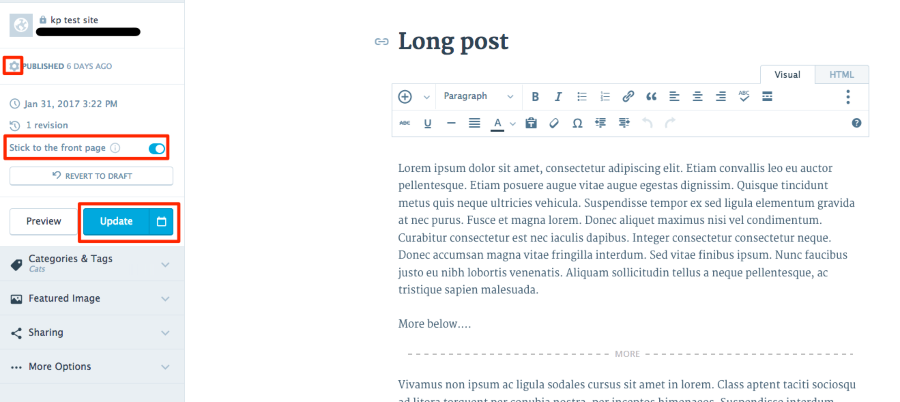
To create a sticky post:
1. In the post editor, click the gear icon at the top left
2. Click the toggle next to “Stick to the front page”
3. Click the Publish or Update button
Let me know how it goes.
-


- The topic ‘how to add sticky post’ is closed to new replies.
 WordPress.com Forums