

How to add the social media icons in the Gallery Theme
-
I would like to know how can I add social media icons at the top menu. I´ve seen the option by adding custom links to a new Menu, but what i don´t know it´s to link the icon with custom link.
Thank youThe blog I need help with is: (visible only to logged in users)
-
You can learn how to set up a social media links menu in the guide here:
Let me know how it goes!
-
Thank you Kathrynwp, I already saw this guide. But the social icons are not displayed properly in the top menu. They appear with a non recognisable icon.
-
I just found this post in Gallery theme support forum which explains how to add social icons.
As the theme author explained in that forum post, go to Sharing Settings screen in your dashboard and connect you social accounts you want to appear on the menu.
Once you connect your accounts, Gallery theme automatically displays the connected accounts’ icons in the menu.
-
Here is the Sharing Settings support document: https://en.support.wordpress.com/publicize/#setting-up-publicize
-
Hi Chaita,
tahnk you so much, I already read that post in the forum.
I know who to conect, I do all the steps, my problem is that the icon displayed at the top menu is NOT recognised.
I´m going to leave it life so you can all see how the icons appear.
Thank you. -
You will see a weird icon at the end of the top menu. This is my problem: not how to conect, but the icon that it´s displayed.
Thanks.
Regards -
Thanks – I see the issue. It looks like there’s a problem loading the Genericons icon font. I’ll have our developers take a look and we’ll get back to you.
-
Looks like it’s your custom CSS that’s overriding the styling of the social menu. By setting Futura as the font family for the menu here:
#access .menu ul li a {
     color: #5e5e5e;
     display: block;
     font-size: small;
     letter-spacing: 0.05em;
    font-family: futura;
     margin: 0px;
     padding: 22px 0.75em;
     text-decoration: none;
     transition: all 200ms ease-in 0s;
}
…you’re overriding the Genericons icon font that the social menu needs to display the social icons.
Try adding this to your custom CSS – further down, below the above chunk of code, to override the above declarations on your social menu links:
li.social-links a {
     font-family: Genericons ! important;
}
That should do the trick – let me know how it goes.
-
-
It could be because there is not much space on the menu bar.
Could you test by removing few menu items and see if twitter icons shows up?
-
-
Looks like you haven’t yet added Twitter to your social links menu, only Facebook:
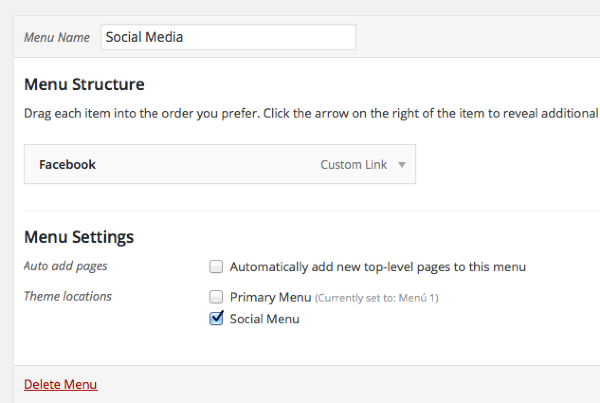
Be sure to press “Save menu” after making changes if you’re in the WP Admin dashboard. Let me know how it goes.
-
Thank you. Now it appears, but in a second line. And there is still space in the menu as I moved a section into another one and still the twitter icon is on a second line
-
Something in your custom CSS is causing the Twitter icon to move onto a second line. If I remove all the custom CSS in a browser inspector, it looks right, as you can see here:

The line I’ve indicated below in your custom CSS appears to be the problem:
#access .menu ul li a {
     color: #5e5e5e;
     display: block; /* PROBLEM LINE */
     font-family: futura;
     font-size: small;
     letter-spacing: 0.05em;
     margin: 0px;
     padding: 22px 0.75em;
     text-decoration: none;
     transition: all 200ms ease-in 0s;
}
Remove that line from your custom CSS.
-
-
Great!
If you need help with your CSS in the future, please feel free to post in the CSS Customization forum:


- The topic ‘How to add the social media icons in the Gallery Theme’ is closed to new replies.
 WordPress.com Forums